Strategy
Recover Facebook Creative Fatigue in 7 Days for Meta Advertisers
By Nick Georgalos · 19 min read · Updated 2026-09-11
Recover Facebook Creative Fatigue in 7 Days for Meta Advertisers ! Manager reviewing fading ad performance If your CTR is dropping while your frequency climbs past a moderate threshold on an ad-set level, you're likely experiencing creative fatigue rather than a broken audience.

If your CTR is dropping while your frequency climbs past a moderate threshold on an ad-set level, you’re likely experiencing creative fatigue rather than a broken audience. The fix isn’t a color swap. Pause the losing ad, check the frequency and CTR trend in Ads Manager right now, and launch a replacement with a genuinely different angle, not just a new visual.
TL;DR:
- Creative fatigue can occur within days due to Meta’s focused delivery, causing rising CPMs, higher CPA, and declining ROAS, especially with Advantage+ campaigns.
- Monitoring ad-level frequency, CTR trends, negative feedback, CPM, and CPA together over 14 days offers a clear signal of fatigue, with thresholds of 2.5 to 3.0 for frequency.
- Causes include argument fatigue, over-concentration on responsive segments, audience overlap, and downstream issues like landing page problems, not just overexposure.
- Running controlled tests by swapping hooks and formats helps confirm fatigue and determine whether to refresh the creative, expand the audience, or fix landing pages.
- Building a system with content pillars, batching, angle rotation, and a 70/30 budget split improves creative longevity and reduces team burnout.
Table of Contents
- What Is Creative Fatigue on Facebook, and Why Does It Happen Faster Now?
- What Metrics Confirm Creative Fatigue Is Actually Happening?
- What Actually Causes Creative Fatigue Beyond Simple Overexposure
- Should You Refresh the Creative, Expand the Audience, or Fix the Landing Page?
- How Do You Fix Facebook Creative Fatigue and Keep Ads Performing?
- How Do You Build a Creative Pipeline That Doesn’t Burn Out Your Team?
- What’s the 7-Day Plan to Recover a Fatigued Ad Set?
- How This Playbook Applies to Life Insurance Lead Campaigns
- An Editorial Take on What Teams Get Wrong
- Get a Managed Creative Pipeline Built for Life Insurance Lead Generation
- Sources
- FAQ
What Is Creative Fatigue on Facebook, and Why Does It Happen Faster Now?
Creative fatigue happens when the same audience sees your ad so many times that engagement drops and cost per result climbs, even though nothing else about the campaign changed. Meta’s own guidance frames it exactly that way: the audience has seen the creative too many times, and the response degrades accordingly.
That’s a different problem than creative burnout, which is a team problem, not a campaign problem. Burnout is what happens to the humans making the ads when the ideas run dry and the deadlines don’t stop. Recovery from that kind of exhaustion requires rest and structural changes to how the work gets assigned. Fatigue is what happens to the ad itself inside the platform. You can fix creative fatigue in an afternoon. Burnout takes longer.
The reason fatigue hits faster in 2026 than it did five years ago comes down to how Meta delivers ads now. Advantage+ campaigns concentrate delivery on the segments most likely to convert, which is great for efficiency early on and terrible for creative longevity. The platform finds your best-performing pocket of the audience and hammers it, which means that pocket burns through your creative’s novelty much faster than a broadly spread campaign would. A tactic that used to have a six-week shelf life might be tapped out in ten days, as explained in common local campaign targeting mistakes that kill response rates.
Left unchecked, the downstream effects show up in three places:
- CPM creeps up as Meta’s auction penalizes an ad that’s losing relevance.
- CPA rises because the same spend now buys fewer conversions.
- ROAS erodes quietly, often before anyone notices the ad “looks the same as always.”
None of that means your offer is broken or your audience dried up. It usually means the ad has been shown too many times to the same people, and the fix lives in the creative, not the targeting.
What Metrics Confirm Creative Fatigue Is Actually Happening?
Guessing wastes budget. Confirming fatigue takes about five minutes in Ads Manager if you know which columns to check and what the numbers mean once you see them.
Start with frequency, viewed at the ad level, not the campaign level. Campaign-level frequency hides fatigue because it averages a burned-out ad against fresher ones running in the same set. Diagnostic benchmarks from practitioners running high-volume accounts put the thresholds like this:
| Frequency (ad-level) | Status | What to do |
|---|---|---|
| Under 2.0 | Healthy | Monitor, no action needed |
| 2.5 to 3.0 | Warning | Start preparing a replacement |
| 3.0 | Danger | Launch the replacement test now |
| above 3.0 | Critical | Pause or drastically cut budget |
Pro Tip: Check frequency by ad, not by ad set. An ad set showing 2.1 average frequency can be hiding one ad already sitting at 4.5, especially once Advantage+ starts concentrating delivery on a narrow slice of your audience.
CTR tells the same story from a different angle. A single-week dip doesn’t mean much. Ad performance wobbles day to day. What matters is the trend: a 10% to 15% week-over-week CTR decline is an early warning worth watching, and a drop of 20% or more over two weeks is a strong confirmation that the creative has worn out its welcome, according to the same practitioner diagnostics.
Two more signals round out the checklist. First, watch for CPM and CPA rising together while CTR falls. That combination means Meta’s auction is charging you more to show an ad fewer people care about anymore, which compounds fast. Second, check the negative feedback rate in the ad’s breakdown, specifically hidden-ad and “see less” actions. A rising trend there, even a small one, usually shows up before the CTR drop does, because annoyed viewers act before disengaged viewers simply stop clicking.
Pull all four into one view using Ads Manager’s breakdown by delivery, filtered to the last 14 days and compared against the prior 14. If frequency, CTR, CPM, and negative feedback are all moving the wrong direction at once, you have your answer. If only one metric moved, keep reading before you touch the creative.
What Actually Causes Creative Fatigue Beyond Simple Overexposure
Overexposure is the mechanism, but it’s rarely the whole story. Four separate root causes tend to produce the same symptoms on the dashboard, and mixing them up leads to wasted production hours.
Angle fatigue is the most underdiagnosed cause. Teams swap the photo, change the color of the button, and reshoot the same script with a different actor, then wonder why performance doesn’t recover. The research on creative rotation is blunt about this: the audience isn’t tired of the visual, they’re tired of the argument. If your ad has said “protect your family from funeral costs” nine different ways with nine different stock photos, you haven’t refreshed anything. You’ve just repainted the same wall.
Delivery concentration compounds the problem. As mentioned above, Advantage+ finds your responsive segment and delivers heavily to it, which means a campaign with a small but highly engaged audience can exhaust that audience’s patience in days rather than weeks.
Audience overlap quietly accelerates everything. Running four ad sets against overlapping lookalike audiences means the same person can see multiple ads from your account in a single day, even if each individual ad set looks healthy in isolation. Check the Audience Overlap tool in Ads Manager before you blame the creative.
Sometimes it isn’t fatigue at all. If frequency is climbing but CTR stays flat while conversion rate drops, the ad is still doing its job of getting clicks. Something downstream is breaking instead: a slow landing page, a confusing lead form, or an offer that stopped matching what the ad promised. Refreshing the creative in that scenario wastes a production cycle solving a problem that lives on your landing page.
Should You Refresh the Creative, Expand the Audience, or Fix the Landing Page?
Matching the fix to the actual cause takes about the same effort as guessing, and it saves you from rebuilding a creative that was never the problem.
| Signal pattern | Likely cause | Test to run |
|---|---|---|
| Frequency up, CTR down, CPM up | Creative fatigue | Hook swap or full angle replacement |
| Frequency flat, CTR flat, conversion rate down | Landing page or offer issue | Landing page variant split test |
| Frequency up, CTR flat, cost per result flat | Audience overlap, not fatigue | Consolidate or expand audience |
| CTR down only on one placement | Format mismatch, not fatigue | Format-specific creative for that placement |
The fastest way to isolate the true cause is a controlled test rather than a hunch. Run a hook swap against the current top performer, holding everything else constant, and watch whether CTR recovers within the same audience. If it does, you’ve confirmed fatigue. If CTR stays flat but conversions still lag, run a landing page variant instead. Only expand the audience once you’ve ruled out both, since a bigger audience with a broken landing page just burns money faster.
A creative refresh is the right move specifically when frequency and CTR are moving in the wrong direction together. Everything else on that table points somewhere other than your ad copy.
How Do You Fix Facebook Creative Fatigue and Keep Ads Performing?
Once you’ve confirmed fatigue, the order of operations matters more than the individual tactics. Do these in sequence, not all at once.
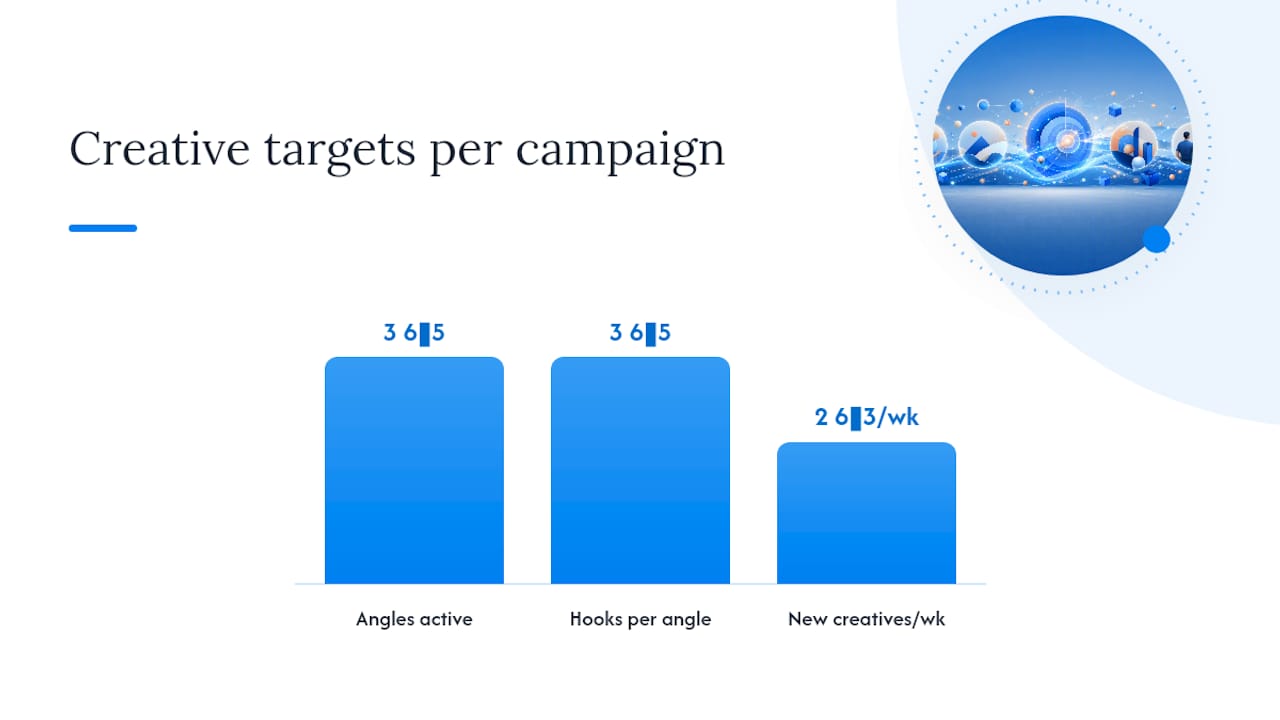
- Rotate angles before you rotate visuals. Keep 3 to 5 distinct angles active in any given campaign at all times, and write 3 to 5 hook variations for each one. This is the single highest-leverage move in the entire playbook, according to agency-level testing data, because a new argument recovers performance far more reliably than a new photo of the same argument.
- Use the hook-swap technique on video. Change only the first three seconds. If your final expense video opens with “Are you covered?” try opening with a specific dollar figure instead, like the average cost of a funeral in your state. The body of the video can stay identical while the hook does the work of re-earning attention.
- Diversify format, not just message. Run the same core angle as a static image, a short-form video, and a carousel simultaneously. Platform usage data shows real differences in how age groups consume short video versus static content, which means format diversity isn’t cosmetic. It’s how you reach people who scroll past static images but stop on Reels.
- Stagger your launch cadence. Launch 2 to 3 new creatives per week rather than dumping ten new ads into an ad set at once. A staggered cadence gives you clean read on which specific creative is working, instead of a muddy average across a pile of untested variants.
- Apply the 70/30 budget rule. Keep 70% of spend on your proven, currently-performing creative and dedicate 30% to testing new angles and hooks. This protects your CPA from crashing while you experiment, and it’s the allocation split most agency playbooks converge on for a reason: it’s aggressive enough to find winners without starving the campaign that’s currently paying the bills.
- Set a minimum sample size before judging a test. Don’t kill or scale a new creative before it has at least 1,000 to 3,000 impressions per audience segment, and give it a minimum three to five day window. Facebook’s algorithm needs a learning period, and judging a test on day one measures noise, not performance.
- Kill fast once the sample is real. If a replacement creative underperforms your control by more than 20% on CTR or cost per result after it’s cleared the minimum sample, kill it and move to the next hook variation. If it beats the control, scale the budget toward it and rotate the old winner into the 30% testing bucket for its own eventual replacement.
- Set frequency caps at the campaign level where the platform allows it, and segment audiences deliberately rather than letting Advantage+ concentrate delivery unchecked on your smallest, most responsive slice.
Pro Tip: Write your hook variations before you write anything else. A team that starts with five headline options and then builds visuals around the winner moves faster than a team that builds five full videos and picks the best one after the fact.
Understanding frequency as a metric matters here specifically because it’s the earliest reliable warning sign in the entire list, and it costs nothing to check daily.
How Do You Build a Creative Pipeline That Doesn’t Burn Out Your Team?
Ad-hoc creative bursts, where someone scrambles to produce three new ads the day performance dips, are exhausting and inconsistent. A repeatable system beats a talented individual working under deadline pressure every time, because systems that produce structured, repeatable formats remove the friction between having an idea and having a finished ad ready to launch.
The simplest version of this system starts with content pillars, meaning the 3 to 5 core arguments your offer can make. For a final expense campaign, pillars might include “protect your family from burial costs,” “no medical exam required,” and “lock in a rate before it rises.” Multiply each pillar by content types, static, short video, carousel, testimonial-style, and you get a matrix that generates a dozen distinct creative directions without anyone staring at a blank page.
A batching calendar turns that matrix into a weekly rhythm instead of a fire drill:
- Ideation day: pick which pillars need fresh hooks based on this week’s frequency data.
- Production block: shoot or design 4 to 6 pieces in one sitting rather than one at a time.
- Review pass: check each new creative against the quality bar below before it goes live.
- Staggered launch: release 2 to 3 per week, per the cadence rule above, instead of all at once.
AI tools have a real place in this system, but a narrow one. Use them to generate angle ideas and rough hook drafts fast, ten headline variations in the time it takes to write two by hand, then have a human pick, sharpen, and finalize. Treat AI output as raw material for the ideation stage, never as the finished ad. A generic AI-polished template rarely beats a rough but specific human-written hook, because specificity is what earns attention in a feed full of generic claims.
Before anything launches, run it through a short quality-control check: does this creative make a genuinely different argument than the last three, not just a different picture? Does the hook change in the first three seconds of any video version? Does it target a distinct pillar rather than restating one you already have three active variations of? If the honest answer to any of those is no, it’s not a refresh. It’s a repaint, and it won’t move your frequency or CTR numbers at all.
Pro Tip: Keep a simple spreadsheet log of every angle you’ve run, with launch date and kill date. After a few months, you’ll see which pillars have the longest shelf life for your specific audience, and that pattern is worth more than any single ad’s performance.
What’s the 7-Day Plan to Recover a Fatigued Ad Set?
Once you’ve confirmed fatigue using the metrics above, don’t overhaul the whole campaign at once. Work through a tight week-long triage instead.
- Day 1: Identify the specific ad driving the frequency spike using ad-level breakdowns, not campaign averages. Cut its budget by half rather than pausing it entirely, so you don’t lose the delivery data mid-diagnosis.
- Day 1 to 2: Draft 3 replacement hooks built on a different angle than the fatigued ad, not a visual variant of it.
- Day 2 to 3: Produce the replacements in at least two formats, one static and one short video, so you’re testing angle and format resilience together.
- Day 3: Launch the replacements at 30% of the ad set’s total budget, keeping the fatigued original at reduced spend as a live comparison point.
- Day 4 to 6: Monitor daily CTR, frequency, and cost per result on the new creatives. Do not judge results before day 4, since early delivery is unreliable.
- Day 6: Compare replacement performance against the original’s baseline from before it fatigued, not against its current degraded numbers.
- Day 7: Kill any replacement underperforming the original baseline by 20% or more, scale the winner to full budget, and fully pause the fatigued original.
This whole cycle protects your budget from swinging wildly while giving the algorithm enough runway to actually learn on the new creative.
How This Playbook Applies to Life Insurance Lead Campaigns
Final expense and IUL campaigns fatigue faster than most verticals because the emotional angles are limited and the audience for a given state is finite. State-based campaigns specifically work to address that constraint, since a fresh geographic segment often behaves like a fresh audience even when the underlying angle stays the same.
In practice, that operational approach looks like this:
- Angle rotation tied to state-specific messaging, since a cost-of-funeral hook resonates differently in a high cost-of-living state than a rural one.
- CPL tracking as the trigger for refreshes, watching for the point where cost per lead climbs past a client’s historical baseline rather than waiting for a fixed calendar date.
- Compliance checks built into every new creative, since final expense and IUL ads carry regulatory language requirements that a rushed refresh can accidentally skip.
Agents using a CPL calculator to benchmark their own numbers can spot the same CPM and CPA divergence described earlier, well before frequency alone would have flagged it, because a rising CPL against flat lead quality is often the first visible symptom of fatigue in a lead-gen account specifically.
An Editorial Take on What Teams Get Wrong
The most common mistake isn’t laziness. It’s mistaking a visual refresh for a real one. Teams change the model in the photo, swap a blue background for green, and call it a new creative, then act surprised when the numbers don’t move. The audience wasn’t reacting to the color. They were reacting to hearing the same pitch for the fourteenth time.
Angle-first thinking beats aesthetic-only refreshes because it addresses the actual thing that wore out: the argument, not the wrapper around it. A team with three genuinely different angles and mediocre production will usually outlast a team with one brilliant angle rendered nine different ways.
The harder balance is velocity against measurement noise. Launching fast feels productive, but judging results before you’ve cleared a real sample size just adds guesswork dressed up as data. Move quickly on production. Move slowly on conclusions.
— Nick
Get a Managed Creative Pipeline Built for Life Insurance Lead Generation
Fexads is the alternative to running this whole diagnostic and refresh cycle yourself: agents get state-based final expense, IUL, and mortgage protection campaigns with angle rotation, compliance checks, and creative refreshes handled inside their own ad account, so every lead and every data point stays owned by the agent instead of shared across a rented list.
That matters most for solo agents and small agencies who don’t have a production team to run the batching calendar described above. The pillar-and-hook rotation is built into ongoing management, with daily monitoring of frequency and CPA, and creatives swapped before fatigue erodes cost per lead. Browse final expense campaigns organized by state to see how the state-specific angle approach works, or check your own numbers against benchmarks using the CPL calculator before deciding whether your current ad set needs a refresh. If the diagnosis points to fatigue and you’d rather not run the seven-day recovery plan solo, request an audit and get a second set of eyes on the account this week.
Sources
- Creative Fatigue Recommendations in Meta Ads Manager
- 7 Signs of Facebook Ads Creative Fatigue (2026 Guide) | Mako Metrics
- How to Beat Creative Fatigue on Facebook Ads (Without Burning Out Your Team) | Adquisition
- How to make your social media content more creative (Later)
FAQ
Is $10 a Day Enough for Facebook Ads?
A $10 daily budget can work for narrow, low-competition local campaigns, but it usually isn’t enough to gather the sample size needed to properly test creative replacements or clear Facebook’s learning phase quickly. Most fatigue-testing cycles need enough daily spend to hit 1,000 to 3,000 impressions per segment within a few days.
Why Am I Suddenly Getting So Many More Ads on Facebook?
Advertisers increase frequency and spend when a campaign is performing well or when they’re actively testing new creative to fight fatigue, which shows up to you as a sudden burst of ads from the same brand. It’s often a sign that brand is either scaling a winner or mid-cycle on a creative refresh.
How Do You Avoid Creative Fatigue on Facebook?
Keep 3 to 5 active angles rotating at all times, check ad-level frequency weekly, and stagger 2 to 3 new creatives into testing each week rather than waiting for performance to crash before producing anything new. Pairing that cadence with a 70/30 budget split between proven and testing creative prevents the scramble that leads to weak, last-minute refreshes.
What’s the Difference Between Creative Fatigue and Audience Fatigue?
Creative fatigue means the same people have seen a specific ad too many times, while audience saturation means you’ve exhausted a targeting segment’s available reach regardless of which creative you’re running. Checking the Audience Overlap tool alongside frequency data helps tell the two apart.
How Often Should I Refresh My Facebook Ad Creative?
There’s no fixed calendar rule, since a healthy ad running at frequency under 2.0 doesn’t need touching, but plan to have replacement creative ready the moment ad-level frequency crosses 2.5 to 3.0 so you’re not scrambling once it hits the danger zone.
Recommended
Want us to run your FE ads?
Two plans from $200 setup. A flat monthly fee from $500 that starts at your first sale.
Apply now