Strategy
4 Ad Rewrites to Pass Facebook's Personal Attributes Policy for Agents
By Nick Georgalos · 10 min read · Updated 2026-09-14
4 Ad Rewrites to Pass Facebook's Personal Attributes Policy for Agents ! Reviewer auditing insurance ad campaign compliance Meta bans any ad that asserts or implies a viewer's sensitive personal traits, from health status to financial hardship, even when the claim is only suggested rather than stated outright.

Meta bans any ad that asserts or implies a viewer’s sensitive personal traits, from health status to financial hardship, even when the claim is only suggested rather than stated outright. The fix is simple in theory: describe the product or service, never the person looking at it. Meta’s own Privacy Violations and Personal Attributes policy is the authoritative source, and every rejection ultimately traces back to that one rule.
TL;DR:
- Ads must describe the service or product without implying or mentioning any protected personal traits, including health, financial, or demographic attributes.
- Implication of sensitive attributes through imagery, tone, or phrasing is treated equally as explicit statements and can lead to rejection or restrictions.
- The entire ad experience, including headlines, images, CTAs, lead forms, and landing pages, is reviewed for compliance, not just the primary copy.
- Rejected ads should be paused, then rewritten to remove any personal trait references, with images adjusted to avoid implying sensitive information, and resubmitted for review.
- Implementing proactive compliance checks, ongoing monitoring, and maintaining a detailed rejection log helps prevent violations and speeds up review processes.
Table of Contents
- What Does Facebook’s Personal Attributes Policy Actually Ban?
- Which Personal Attributes Does Meta Prohibit in Ads?
- What Language Is Allowed Under This Policy?
- Where Does Meta Enforce This Policy Across Your Funnel?
- How Do You Fix a Rejected Ad or Restricted Account?
- How Do Agencies Build Compliance Into Every Campaign?
- Why Meta Enforces This So Strictly
- Run Compliant Facebook Ad Campaigns Without the Guesswork
- Sources
- FAQ
What Does Facebook’s Personal Attributes Policy Actually Ban?
The policy exists because implication is treated the same as a direct statement. Writing “Struggling with high blood pressure?” assumes a health condition about the reader, and Meta flags that just as fast as “You have high blood pressure.” The same logic covers age, financial status, sexual orientation, and a dozen other categories detailed in Meta’s Transparency Center policy page.
Here’s the quick checklist to run before anything goes live:
- Don’t ask questions or make statements that assign health conditions, financial hardship, criminal history, or other protected traits directly to the reader.
- Do write copy as a service description (“Programs available for family caregivers”) instead of a personal diagnosis (“You’re overwhelmed caring for a parent”).
- Run the sentence test: remove the product or brand name from the line. If it still reads like a description of the viewer, rewrite it.
- Check headlines, body text, and CTAs separately. A clean headline with a risky CTA still gets rejected.
That last check catches more violations than people expect, because reviewers (human or automated) don’t grade sentences in isolation.
Which Personal Attributes Does Meta Prohibit in Ads?
Meta names a specific list, and it’s longer than most advertisers assume. Protected attributes include race, ethnicity, national origin, religion, age, sex, sexual orientation, gender identity, disability, physical or mental health conditions, financial vulnerability, voting status, trade union membership, criminal record, and even someone’s name used to suggest a personal trait.
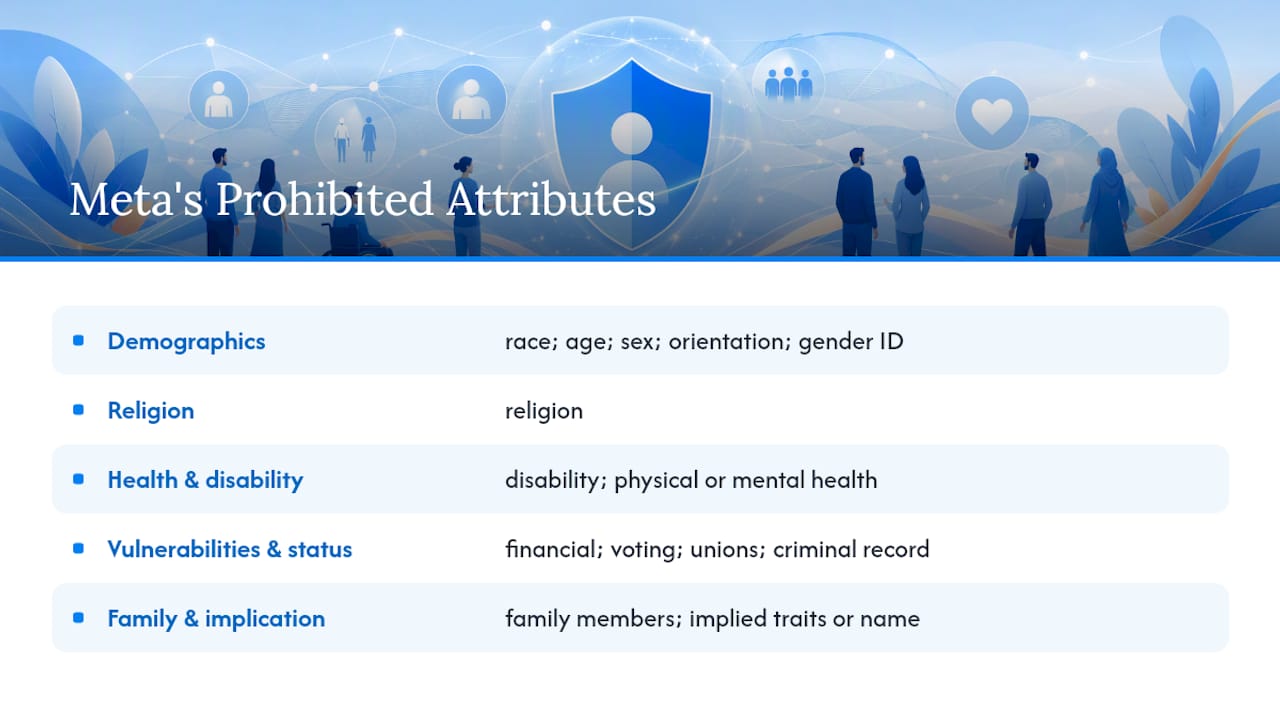
Two details trip up experienced advertisers. First, the protection extends to family members. An ad implying a viewer’s spouse has a specific illness violates the policy just as much as targeting the viewer directly. Second, implication carries the same weight as an explicit claim. Meta’s policy examples and change log make clear that a knowing wink toward an attribute, through imagery, tone, or phrasing, is enforced identically to a flat statement. That’s the part most rejection appeals get wrong: advertisers argue they never said the word, but Meta is grading what the sentence implies, not just what it states.
What Language Is Allowed Under This Policy?
Meta permits broad references and neutral service framing. You can call someone a “New Yorker,” a “parent,” or a “pet owner” because those aren’t sensitive categories. You can also use “you” and “your” freely, as long as the pronoun connects to a general interest or product benefit rather than a diagnosis, financial state, or protected identity.
Here’s how the rewrite pattern works across common verticals:
- Health: “Dealing with diabetes?” becomes “Explore programs designed to support healthy living.”
- Financial services: “Drowning in debt?” becomes “Learn about options for managing monthly expenses.”
- Age-related products: “Feeling the effects of aging?” becomes “Discover solutions built for active adults.”
- Insurance and caregiving: “Worried about your aging parent’s care costs?” becomes “Compare coverage options for families planning ahead.”
Visuals matter just as much as copy. Avoid before-and-after photos that read as a diagnosis, and skip images that identify a specific medical condition or financial hardship, even if the text stays neutral. A stock photo of someone looking distressed next to a debt-relief headline can trigger the same flag as risky copy, because Meta’s practitioner examples show reviewers weigh emotional framing alongside literal wording.
Where Does Meta Enforce This Policy Across Your Funnel?
Meta reviews the entire ad experience, not just the primary text field. That includes the headline, body copy, call-to-action button, any text embedded in images or video, Instant Form questions and intro screens, and the landing page the ad points to.
This is where a lot of advertisers get blindsided. You can clean up your primary ad copy, resubmit, get approved, and still get flagged later because your lead form’s intro screen says “For people managing chronic health conditions” or your landing page headline repeats the exact phrasing you already removed from the ad. Each surface gets evaluated, sometimes independently, so a violation buried in a form field can restrict delivery even when the visible ad looks compliant. Targeting and data setup are checked on a separate track entirely. A perfectly worded ad can still get flagged over how a custom audience or pixel event was built, which is a different problem from personal-attribute language but gets confused with it constantly.
How Do You Fix a Rejected Ad or Restricted Account?
Start by pausing the ad rather than letting it run in limbo. Then work through remediation in order:
- Duplicate the ad instead of editing the original, so you preserve performance history while testing the fix.
- Strip any phrasing that assigns a condition, status, or trait to the viewer, and rewrite it as a service description.
- Replace images that visually imply a sensitive attribute, especially in health, financial, and insurance verticals.
- Submit the ad for review through Account Quality inside Meta Business Suite, and document exactly what you changed.
- If the account itself gets restricted rather than just one ad, request an account-level review and be specific about which asset triggered it.
Repeated restrictions on the same account usually mean a pattern problem, not a one-off wording mistake. At that point, a full funnel audit, or a second set of expert eyes, beats another round of trial-and-error edits. Guides like running final expense ads without losing your account walk through the specific triggers common in regulated insurance verticals.
How Do Agencies Build Compliance Into Every Campaign?
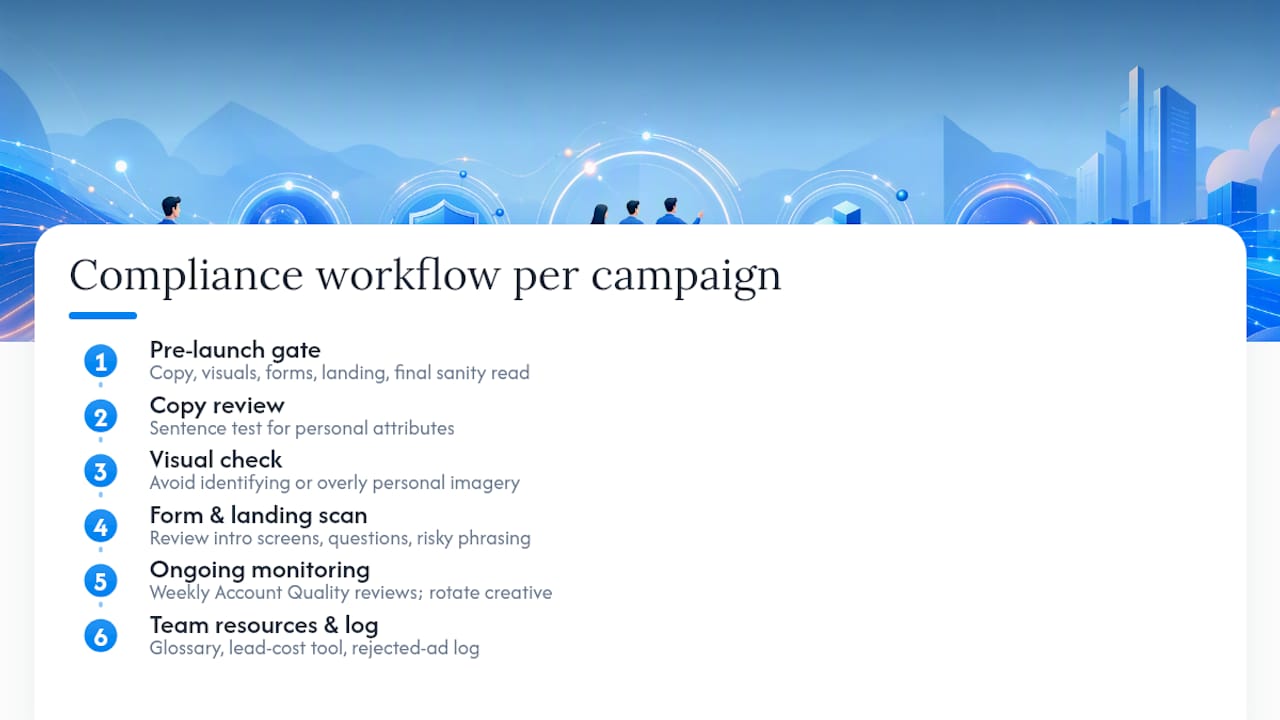
Treating compliance as a pre-launch gate, not a post-rejection scramble, is what separates accounts that scale from accounts that keep getting throttled. A working gate looks like this: copy review against the sentence test, a visual pass checking for identifying or overly personal imagery, a lead-form review of every intro screen and question, a landing-page scan of repeated risky phrasing, and one final sanity pass reading the whole funnel start to finish as if you were the viewer, as detailed by professional AI consulting services that formalize compliance checks and automated copy review workflows.
Ongoing monitoring matters just as much as the pre-launch check. Weekly Account Quality reviews catch drift before it becomes a pattern, and rotating creative on a schedule keeps funnels from accidentally escalating personalization over time, which happens gradually as teams chase performance and loosen language without noticing.
Resources like the Facebook Ads Glossary and a lead-cost calculator help agencies keep terminology and budget planning consistent across a team, which matters once more than one person is writing ad copy.
Pro Tip: Keep a simple log of every rejected ad, the exact phrase that triggered it, and the fix you applied. After a few months, that log becomes your team’s internal style guide, and it cuts review time dramatically because you stop relitigating the same mistake twice.
Why Meta Enforces This So Strictly
Meta isn’t policing wording for its own sake. The rule exists because being publicly, algorithmically identified by a health condition or financial struggle feels invasive, even when the ad is well intentioned. Meta’s own privacy and ad-controls updates reflect that same push toward transparency and user comfort, not just legal cover.
The mindset shift that actually helps: write from the service outward, never from a diagnosis of the reader inward. Personalization still works. It just has to target interest, not identity.
— Nick
Run Compliant Facebook Ad Campaigns Without the Guesswork
Fexads builds compliant campaign setups from day one, so agents aren’t rewriting rejected ads at 11 PM trying to figure out which line triggered the flag. That means custom ad creative reviewed against Meta’s personal-attributes standards before launch, lead-form integration that avoids the intro-screen mistakes that trip up so many funnels, and ongoing monitoring so a compliant ad stays compliant as it scales.
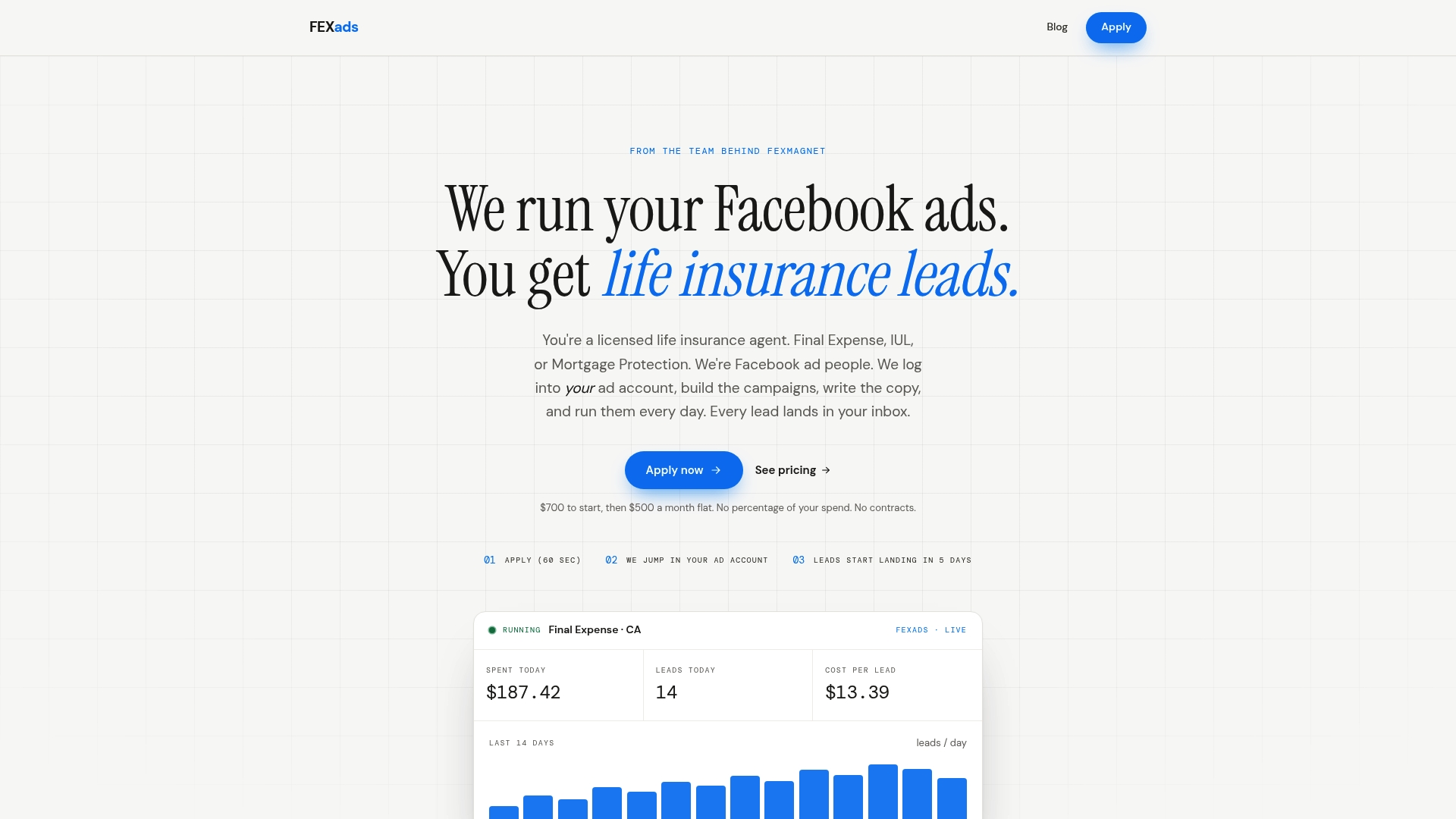
Every lead generated lands directly in your own ad account, and you keep full ownership of the data and audience insights that come with it. If you’re a licensed agent working final expense, IUL, or mortgage protection leads and tired of untangling policy rejections on your own, check out FE Facebook Ads by State to see what a compliant, done-for-you setup looks like in your market.
Sources
For the policy language itself, start with Meta’s Business Help page on Privacy Violations and Personal Attributes and the Transparency Center’s policy breakdown, which includes the change log. For real rejection examples and rewrite patterns, AdComply’s practitioner guide covers scenarios the official pages only summarize.
- About Meta’s Privacy Violations and Personal Attributes …
- Privacy Violations and Personal Attributes
- The updated Meta privacy policy and new ad controls
- Adcomply
FAQ
How Do I Fix My Disabled Facebook Ad Account?
Request a review through Account Quality in Meta Business Suite, and be specific about which ad or asset likely triggered the restriction. Document the exact wording or imagery you’ve since removed, since vague appeals get denied more often than specific ones.
How Do I Know If I Violated Facebook’s Community Standards?
Check whether your ad copy, images, lead-form intro, or landing page assigns a health, financial, or other protected condition to the viewer, even by implication. Run the sentence test: remove the product name and see if the line still reads like a description of the person.
What Is Meta’s Advertising Policy on Personal Attributes?
Meta prohibits ads that assert or imply a viewer’s race, religion, health status, financial situation, sexual orientation, disability, age, criminal record, or other sensitive traits, whether directed at the viewer or their family. The official policy requires copy to describe the product or service instead.
What Is the Facebook “20 Rule”?
Meta had an older guideline limiting how much text could appear on ad images, separate from the personal-attributes policy. Meta phased out strict enforcement of that specific rule, though excessive text can still hurt ad delivery and performance.
Can I Use “You” or “Your” in My Ad Copy?
Yes, as long as the pronoun connects to a general interest, benefit, or broad group reference rather than a sensitive attribute. “You’ll love this coverage option” is fine; “You’re worried about your diagnosis” is not.
Recommended
Want us to run your FE ads?
$700 to launch, custom website included. $500 a month flat after that.
Apply now