Strategy
5 Minute Callback: Make Insurance Facebook Lead Forms Yours
By Nick Georgalos · 13 min read · Updated 2026-09-08
5 Minute Callback: Make Insurance Facebook Lead Forms Yours ! Agent reviewing a Facebook lead form Yes, Facebook lead forms work for life and final-expense agents, but only when built correctly.

Yes, Facebook lead forms work for life and final-expense agents, but only when built correctly. The winning setup is Higher Intent, two to three qualifying questions, a pixel and CRM webhook feeding leads instantly, TCPA-compliant consent language, and a follow-up call inside five minutes. Skip any one of those pieces and you’re back to buying rented leads with someone else’s name on them.
TL;DR:
- Using higher intent lead forms with two to three qualifying questions and instant follow-up significantly increases policy conversion rates.
- Proper tracking with Meta’s pixel events and real-time CRM integration is essential for optimizing lead quality and speed.
- Speed to contact, within five minutes using automated messaging and live calls, dramatically outperforms delayed outreach in closing sales.
- Compliance requires a live privacy policy link and TCPA-style consent language documented in your CRM to prevent regulatory issues.
- Owning your ad account, pixel, and lead data over time allows continuous improvement, unlike rented or shared leads that hinder audience building and optimization.
Table of Contents
- What Should Your Insurance Facebook Lead Form Actually Look Like?
- How Do You Set Up Tracking So Leads Arrive Instantly?
- Which Fields and Questions Belong on the Form?
- What Creative and Targeting Actually Pre-Qualify Prospects?
- What Happens in the First Five Minutes After a Lead Submits?
- What Compliance Steps Does Every Lead Form Need?
- How Do You Know If Your Lead Form Is Actually Working?
- What Do Agencies That Run These Campaigns Every Day Actually See?
- Why the Standard Lead-Buying Playbook Fails Most Agents
- Ready to Run Facebook Lead Forms That Actually Belong to You?
- Sources
What Should Your Insurance Facebook Lead Form Actually Look Like?
Before you touch Ads Manager, run through this list. Every item here prevents a mistake that either burns budget or creates a compliance headache down the road.
- Declare the Special Ad Category (Credit) so Meta applies the correct targeting restrictions from the start.
- Install the Meta Pixel on your website or landing page, even if you’re running Instant Forms natively.
- Connect a CRM or Leads Webhook so submissions land somewhere besides your Meta notifications inbox.
- Choose the Higher Intent form type over More Volume for relevant insurance offers.
- Add two to three qualifying questions that give you real sales context, not just contact info.
- Include a privacy policy link and short TCPA opt-in language directly in the form.
- Turn on phone number verification to cut down on fat-finger typos and fake entries.
- Set up automated speed-to-lead messaging (SMS and email) that fires the moment a lead submits.
- Budget for at least one week of creative and question testing before you judge results.
- Confirm your ad account is in your name, not an agency’s shared account, so the leads and data belong to you.
That last point matters more than agents realize. Rented and shared-account leads have a habit of showing up in three other agents’ phones the same week.
How Do You Set Up Tracking So Leads Arrive Instantly?
Meta requires every insurance advertiser running life- or credit-related offers to declare the Special Ad Category, which removes certain age, gender, and zip-code targeting options. It’s not optional, and campaigns that skip it get flagged or shut down mid-run.
You still need the Meta Pixel even when leads submit natively inside Facebook, because the pixel feeds Meta’s algorithm the signal it needs to find more people like your best leads. Configure three events at minimum: Lead (fires on form submission), SubmitApplication (fires when a prospect completes a deeper intake step), and CompleteRegistration (fires on a booked appointment or signed application). Without these, Meta optimizes for cheap clicks instead of people who actually buy policies.
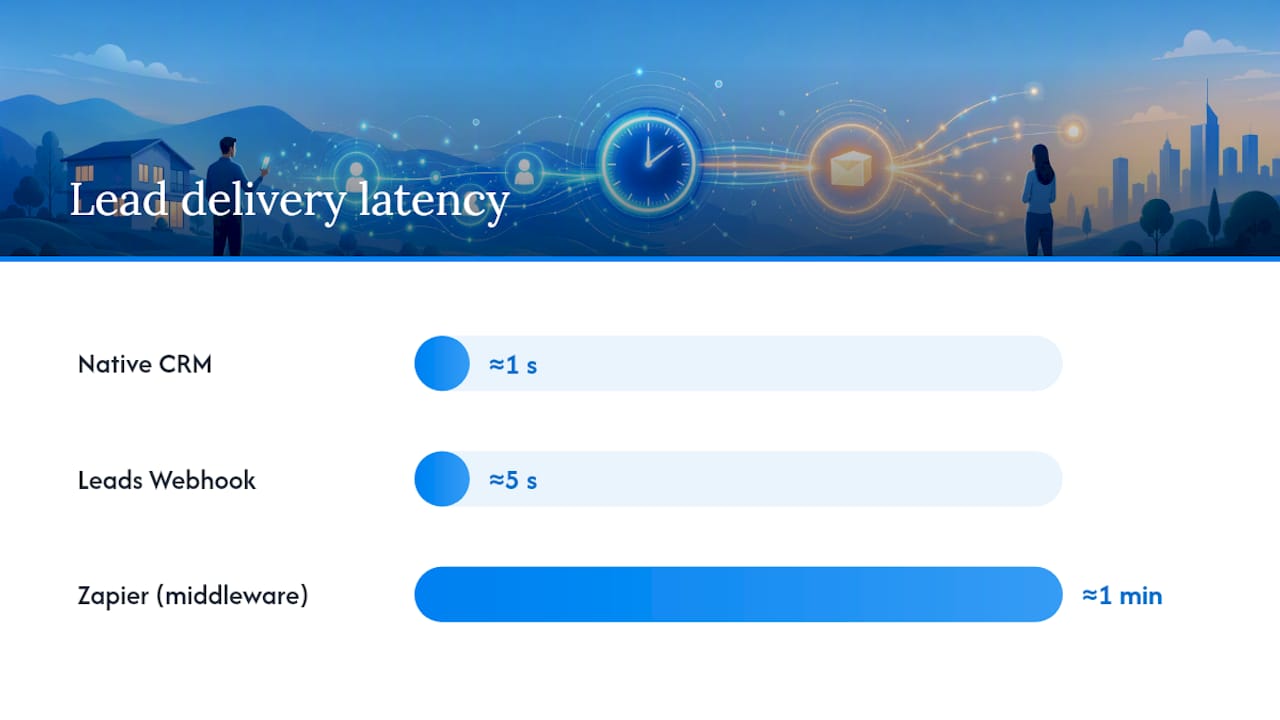
Getting the lead data out of Facebook and into your CRM has three common paths:
- Native CRM integration. Many CRMs plug directly into Meta’s Lead Ads API. Delivery is near-instant and this is the cleanest option if your CRM supports it.
- Meta’s Leads Webhook. A direct webhook connection pushes new leads to your system in seconds. It requires a developer or a platform like FexAds to configure it correctly on your ad account.
- Zapier or similar middleware. Easiest to set up without code, but expect a delay of anywhere from a few seconds to a couple of minutes, depending on how often the “zap” checks for new entries.
Pro Tip: Submit a test lead through your own ad before launch, then time how long it takes to appear in your CRM. If it takes more than two minutes, fix the pipeline before you spend a dollar on traffic.
Which Fields and Questions Belong on the Form?
Keep the contact section minimal: full name, phone number, and email. That’s it. Every additional required field drops completion rates without adding sales value, since you can gather the rest through qualifying questions or a follow-up call.
The two to three qualifying questions are where the form earns its keep. For final expense and life insurance offers, strong options include:
- “What is the primary reason you’re looking into life insurance right now?” (funeral costs, paying off debt, leaving money to family)
- “Do you currently have any life insurance coverage?”
- “What is your approximate age range?” (useful for pre-sorting IUL versus final expense conversations)
Order matters. Placing qualifying questions before the contact fields, rather than after, tends to filter out casual browsers early. Someone who won’t answer a simple multiple-choice question about their coverage isn’t likely to pick up your call either.
This is also where the Higher Intent versus More Volume decision comes in. Meta’s Higher Intent form type adds a review screen before submission, asking the prospect to confirm their information one more time. That extra friction typically cuts submissions by a moderate percentage, but the leads that come through tend to be more serious.
Insurance verticals already carry higher costs on Meta. Benchmark data puts finance and insurance CPCs around $3.77, well above the cross-industry average, and qualified insurance leads with screening questions often run $25 to $50 per lead compared to $5 to $15 for bare-bones, unqualified submissions.
That gap looks bad on a spreadsheet until you calculate cost per bound policy, which is where Higher Intent usually wins. Some agents keep the Instant Form intentionally short and hand off the deeper application to a Facebook lead form style intake page or a tool like Canopy Connect, gathering just enough on Facebook to qualify the prospect and saving the detailed underwriting questions for a live conversation.
What Creative and Targeting Actually Pre-Qualify Prospects?
Good creative does half the qualifying work before anyone touches the form; for expert Facebook ad creative and testing strategies, see this social media advertising guide. Prospects who click on an ad about “leaving your family cash instead of a funeral bill” already know what you’re selling. Prospects who click a vague “protect your family” ad often don’t.
Hooks that consistently pull serious inquiries for final expense and life coverage:
- Direct funeral-cost framing: naming the actual average cost of a funeral and asking whether the prospect’s family could cover it today.
- Family protection angles aimed at parents or grandparents with young dependents.
- Urgent renewal or “coverage ending” messaging for prospects with employer policies about to lapse.
- Simple, agent-on-camera videos that explain who qualifies and what the process looks like, which builds trust faster than stock photography ever will.
Test at least three creative variations per campaign, ideally mixing a talking-head video, a static image with bold cost framing, and a carousel walking through common questions. On targeting, social platform usage remains broad enough across age groups that lookalike audiences built from your existing buyers, combined with life-event signals like new grandparents or recent retirees, tend to outperform broad interest targeting. Because of Special Ad Category restrictions, you can’t target by age or gender directly, so lean on lookalikes and interest signals instead. Start creative tests at $20 to $30 per day per ad set. That’s enough spend to get a meaningful read within a week without burning through your monthly budget on one unproven hook.
What Happens in the First Five Minutes After a Lead Submits?
Speed separates agents who close policies from agents who wonder why their “hot leads” never pick up the phone. One practitioner tracked contact outcomes for leads that got an instant response versus a two-hour delay and found the delayed group performed dramatically worse. The lesson is blunt: minutes matter more than the ad creative you spent all week perfecting.
Here’s the sequence worth building:
- Immediate automated text and email. Within seconds of submission, the prospect gets a short SMS confirming their request and letting them know a licensed agent will call shortly.
- Live call within five minutes. This is the single biggest lever in the entire funnel. A short script works best: confirm their name, reference the specific question they answered on the form, and ask when they have five minutes to talk.
- Log every outcome in your CRM, including consent language shown and the timestamp of contact, so you have a record if a prospect later disputes being contacted.
- Fallback cadence for no-answers. Call again within the hour, then follow a seven-day text and call nurture sequence for anyone who doesn’t pick up on the first two attempts.
Pro Tip: Set your CRM to alert you by text, not just email, when a new lead arrives. Email notifications get buried; a text buzzing your phone doesn’t. For a full minute-by-minute script, a speed-to-lead follow-up playbook walks through exactly what to say on that first call.
What Compliance Steps Does Every Lead Form Need?
Meta won’t approve a lead form without a working privacy policy link, and it needs to actually describe how you collect, store, and use the prospect’s information, not just be a generic placeholder page.
Beyond Meta’s requirement, TCPA compliance protects you from far bigger problems than a rejected ad. A short consent line on the form, something like “By submitting this form, I agree to be contacted by phone, text, or email regarding insurance options,” should sit near the submit button, and the exact wording shown to each prospect needs to be logged in your CRM alongside their submission.
A short checklist before you launch:
- Privacy policy link is live and describes your actual data practices.
- TCPA-style consent language appears directly on the form, not buried in a separate document.
- Consent text and timestamp are saved per lead in your CRM record.
- Carrier-specific rules are checked, especially for Medicare-related products, since CMS marketing rules differ from general TCPA guidance.
- Any doubt about a specific carrier or state requirement goes to your compliance contact or an attorney, not a guess.
How Do You Know If Your Lead Form Is Actually Working?
Four numbers tell you almost everything: cost per lead (ad spend divided by leads), contact rate (leads reached divided by total leads), quote rate (quotes given divided by leads contacted), and cost per bound policy (total spend divided by policies issued). That last number is the only one that actually pays your bills.
Higher CPL paired with better screening often beats cheap volume once you run the full funnel math instead of just eyeballing the cost-per-lead line.
Run these experiments in priority order:
- Higher Intent versus More Volume, same creative and audience.
- Two qualifying questions versus three, to find where completion rate drops off a cliff.
- Phone verification on versus off.
- Two distinct creative hooks (cost framing versus family protection) against the same audience.
Don’t call a winner until each test variant has run long enough to produce at least 50 leads per side; smaller samples swing wildly and lead to bad decisions.
What Do Agencies That Run These Campaigns Every Day Actually See?
The platform builds and manages Facebook ad campaigns for licensed life insurance agents selling final expense, IUL, and mortgage protection, with leads generated inside the agent’s own ad account, not a shared or resold pool.
The single biggest difference between agents who succeed with Facebook leads and agents who give up after one bad batch isn’t the ad creative. It’s whether they own the account, own the pixel data, and can keep refining the audience over months instead of starting from zero with a new lead vendor every few weeks.
Each campaign gets built around the specific offer an agent sells, with the pixel and webhook wired in from day one so leads move instantly instead of sitting in a Facebook inbox. Agents get real-time visibility into what’s working, without paying for extra CRM software or a rental fee on top of ad spend, at Fexads.
Why the Standard Lead-Buying Playbook Fails Most Agents
The insurance industry has trained agents to think of leads as inventory to purchase, not audiences to build. That mindset is backwards, and it’s why so many agents cycle through vendor after vendor without ever improving their numbers.
The uncomfortable truth: a rented lead sold to three other agents was never yours to optimize. You can’t build a lookalike audience from someone else’s buyer data, you can’t retarget prospects who didn’t convert the first time, and you have no idea whether that lead came from a genuine ad or a sweepstakes-style form designed to harvest phone numbers. Higher Intent forms and speed-to-lead discipline matter, but they only compound in value when you own the ad account long enough to learn from every campaign you run.
Most agents overestimate the importance of the perfect ad hook and underestimate the cost of a slow follow-up. A mediocre ad with a five-minute callback will beat a brilliant ad with a two-hour callback almost every time. Fix your response speed before you touch your creative.
— Nick
Ready to Run Facebook Lead Forms That Actually Belong to You?
The service builds the entire setup for you: custom campaign creation, pixel installation, webhook integration, compliant creative, and daily optimization, all inside your own ad account so the leads and the data are yours, not shared with other agents running similar offers. There are no additional software rental fees, and campaigns can be tailored to your product focus.
If you want to see what this costs before committing, the CPL calculator gives you a realistic range based on your state and product line. When you’re ready to move forward, check state-specific availability to see current setup options for your area.
This article is general information, not a substitute for advice from a qualified financial advisor. Consult a qualified financial professional about your own circumstances before acting on anything here.
Sources
- Ask the Right Questions on Your Lead Ads with Instant Form
- Facebook Ads for Insurance: Lead Gen Strategy - Scale Growth Digital
- Meta Lead Ads: Instant Forms, Setup & CRM | Digital Codex
Recommended
Want us to run your FE ads?
Two plans from $200 setup. A flat monthly fee from $500 that starts at your first sale.
Apply now