Strategy
Agents: When a 1 Mile Facebook Radius Backfires, Use 3–5 Miles
By Nick Georgalos · 13 min read · Updated 2026-09-06
Agents: When a 1 Mile Facebook Radius Backfires, Use 3–5 Miles ! Agent reviewing geographic ad targeting map Radius targeting on Facebook lets you drop a pin and serve ads to everyone Meta places inside that circle.

Radius targeting on Facebook lets you drop a pin and serve ads to everyone Meta places inside that circle. The rule that determines whether it actually works: pick the smallest radius that still gives the auction enough people to optimize delivery, rather than simply the smallest radius your business logic prefers. Go too tight and Meta either throttles delivery, inflates your cost per result, or quietly widens the circle behind your back.
TL;DR:
- Using a radius smaller than 3 to 5 miles risks higher CPMs, delivery issues, and unnecessary expansion due to Meta’s minimum audience thresholds.
- Effective radius targeting relies on real-time audience estimates and cross-referencing delivery reports to detect unintended spillover or expansion.
- Urban areas generally allow precise targeting within 2 miles, while rural zones often lead to less accuracy due to triangulation and geolocation limitations.
- Ad campaigns should combine multiple smaller clusters with exclusion pins for better efficiency and to avoid waste in low-conversion areas.
- Strict radius settings are most suitable for highly localized businesses or retargeting, but broad or regional campaigns should use larger radii or alternative targeting methods.
Table of Contents
- How to Set Radius Targeting on Facebook Ads Manager
- What Are the Radius Limits and Why Delivery Behaves Differently at Each End
- Why Ads Sometimes Appear Outside Your Radius (And How Accurate Targeting Really Is)
- What Radius Should You Actually Use by Business Type
- Optimization Tactics That Make Radius Targeting Actually Efficient
- How FexAds Applies Radius Rules to Exclusive Lead Campaigns
- Real-World Radius Targeting Wins Worth Studying
- Negotiating Tight-Radius Requests From Clients
- Get Radius Targeting Set Up Right the First Time
- Where to Verify These Radius Rules Yourself
- Sources
How to Set Radius Targeting on Facebook Ads Manager
Setting radius targeting happens at the ad set level, and the process takes about two minutes once you know where Meta buries the controls.
- Open Ads Manager, select or create your campaign, then go to the Ad Set tab and scroll to the Audience section.
- Under Locations, drop a pin by typing an address or ZIP code, or click directly on the map where your coverage area needs to start.
- Drag the radius slider or type an exact number, then toggle the unit between miles and kilometers depending on your market.
- Choose a location relationship: people who live in this area, were recently in this area, or are traveling in this area.
- Repeat the pin process for additional service areas if you’re covering more than one town or ZIP cluster.
- Add exclusion pins for any pocket inside your radius you don’t want to pay to reach.
- Check the audience estimate on the right panel before publishing.
A few operational notes make this less error-prone:
- Meta remembers your last-used unit setting, so double-check miles versus kilometers every time you duplicate an ad set across markets.
- Multiple pins in one ad set are additive, not exclusive. Meta targets the combined area, not just the newest pin you dropped.
- Exclusion pins work the same way as inclusion pins. Drop one, set its own radius, and Meta subtracts that circle from your total coverage.
- The audience estimate updates in real time as you adjust the slider, and a number that looks too small before you launch usually stays too small after you launch.
According to Meta’s own location targeting documentation, radius targeting supports pin-drop selection with defined minimum and maximum distances, and it will not extend your reach across a country border no matter how the map appears to render coverage. If you’re running a service area near a national boundary, that circle stops cold at the line even when the visual overlay suggests otherwise.
What Are the Radius Limits and Why Delivery Behaves Differently at Each End
Meta’s documented radius floor sits around 1 mile (or roughly 1 kilometer in markets that default to metric units), and the ceiling runs to about 50 miles, according to Meta’s location targeting guidance. Those numbers define what the interface will let you type. They don’t define what the auction will let you win efficiently.
Statistic to know: Meta requires a minimum viable audience size to serve an ad, so using a very small radius in a low-density ZIP code can fall below that threshold, triggering delivery errors before your campaign spends budget, per Meta’s own help documentation on location targeting error codes.
Practitioner testing backs this up from the other direction. Meta’s system technically accepts a 1-mile radius, but the auction frequently penalizes it. Reported effects include higher CPMs, throttled delivery, and Advantage+ audience expansion kicking in to compensate for a pool the algorithm considers too thin, according to one detailed breakdown of radius minimums and geo strategy. Practitioners recommend 3 to 5 miles as a more realistic minimum radius in most markets, using 1-mile targeting primarily for retargeting instead of broad acquisition.
A few things worth checking before you assume your tight radius is behaving:
- Pull the region breakdown in Ads Manager reporting to see where impressions actually landed.
- Compare your audience estimate at setup against your actual reach in delivery reports. A big gap signals expansion.
- Watch for Advantage+ audience settings that override your manual radius unless you’ve explicitly turned them off.
- Re-check your radius after any campaign duplication. Unit settings and pin placement don’t always carry over cleanly.
Why Ads Sometimes Appear Outside Your Radius (And How Accurate Targeting Really Is)
Meta doesn’t rely on one signal to decide who lives inside your circle. It blends GPS data, IP address, connection type, and device information, and when those signals disagree, the system infers a best guess rather than defaulting to the most conservative option. That inference is the main reason ads occasionally serve outside a radius that looked airtight on the map.
The location relationship you choose changes how strict that inference gets:
- Living in targets people whose long-term signals point to a home address inside your circle. This is the tightest and most reliable option for local service businesses.
- Recently in targets anyone Meta detected inside the area within the past several days, useful for event-based or visit-triggered campaigns but noisier by design.
- Traveling in targets people whose home location is elsewhere but who are currently detected inside your radius, built for tourism and travel-adjacent offers.
Device density plays a bigger role in accuracy than most advertisers assume. Dense urban ZIP codes carry more phones, more Wi-Fi triangulation points, and tighter GPS resolution, so a 2-mile radius in a city center behaves close to what you’d expect. Rural coverage areas often lean on cell tower triangulation or IP-based geolocation instead, which can place someone technically inside your radius when their actual address sits several miles past the line.
Advertiser forum threads back this up anecdotally: several users reported that selecting a city by name rather than dropping a manual pin added extra miles of coverage they never intended, pulling in nearby towns they’d meant to exclude. To verify your own delivery, pull the region breakdown report after your first few days live, cross-reference it against your intended coverage map, and adjust pin placement rather than city-name selection if you see spillover.
What Radius Should You Actually Use by Business Type
Radius selection should follow your business objective and your local population density, not a generic default. Here’s how the ranges typically break down:
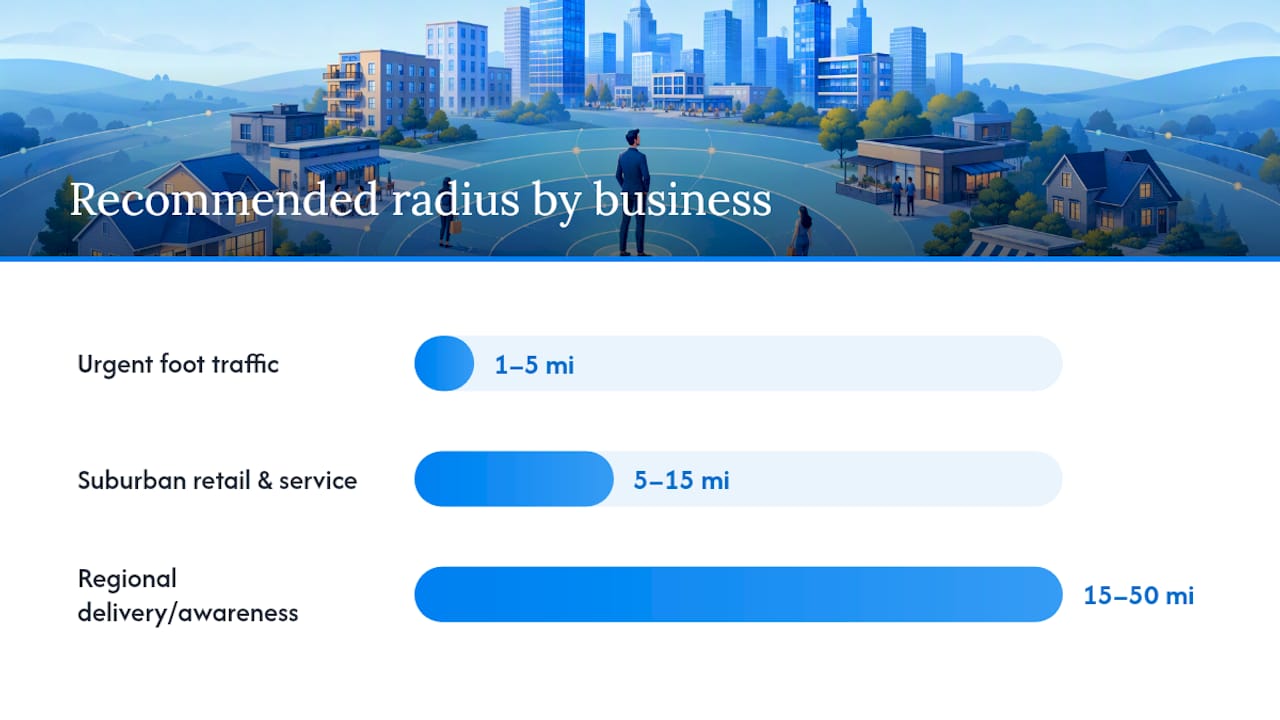
- 1 to 5 miles: Businesses needing urgent foot traffic. Local retail, restaurants, urgent service calls, anything where the customer needs to physically walk in soon.
- 5 to 15 miles: Retail chains and suburban service businesses. Most home services, local agents, and multi-location retailers land here.
- 15 to 50 miles: Regional awareness campaigns or delivery-zone businesses. Insurance agents, contractors covering a county, and any business where the customer doesn’t need to be nearby physically.
For coverage that spans an entire metro or service territory, consider city name plus a mileage buffer, a curated ZIP code list, or a Designated Market Area instead of a single pin. ZIP lists give you surgical control over which neighborhoods count. DMAs give you auction depth when a single small radius can’t generate enough impressions to compete efficiently.
Population density should adjust every range above. A dense metro area packs more prospects into 3 miles than a rural county packs into 30, so tighten your radius in cities and widen it outside them. Match your location relationship to your objective too: “living in” for most local service and lead generation work, “recently in” for event promotion, “traveling in” only if your offer genuinely targets visitors.
Pro Tip: Before locking in any radius under 5 miles, check the audience estimate against your monthly budget. If Ads Manager shows fewer than roughly 15,000 to 20,000 people in the estimate and you’re spending more than a few hundred dollars a month, you’re likely to see rising CPMs within the first week.
Optimization Tactics That Make Radius Targeting Actually Efficient
Setting a radius is the easy part. Making it perform well over weeks and months takes a handful of tactics most advertisers skip.
- Build exclusion patterns, not just inclusion circles. If a portion of your radius covers a low-income area, an industrial zone, or a ZIP code with historically poor conversion, carve it out with an exclusion pin rather than accepting the waste. Agencies call this the “Swiss cheese” approach, and it consistently beats one uniform circle for efficiency, according to geofencing strategy guides.
- Cluster small radii around your highest-intent pockets. Rather than one 20-mile circle, run three or four 3 to 5 mile clusters around your best-performing neighborhoods, each with its own budget allocation you can scale independently.
- Layer demographics and interests conservatively. Stacking age, income, and interest filters on top of an already-tight radius can shrink your audience below the viable threshold. Keep at least one broad signal open so the delivery algorithm has room to work, a point geographic targeting guides reinforce repeatedly.
- Reserve true 1-mile radii for retargeting. Warm audiences already familiar with your brand tolerate a thin pool better than cold prospecting does. Cap frequency so the same handful of people aren’t seeing your ad a dozen times a week.
- Measure by location, not just campaign totals. Pull region breakdowns to see cost per result by ZIP or DMA, and if you’re running a physical location, register it for store-set location targeting so store-visit reporting ties back to the radius that generated it.
Pro Tip: Check your CPA by radius segment every two weeks, not just overall campaign CPA. A blended average can hide one cluster quietly burning budget while another one carries the whole campaign.
How FexAds Applies Radius Rules to Exclusive Lead Campaigns
FexAds builds radius strategy around one constant: leads generate directly inside the agent’s own ad account, so every radius decision has to protect audience size, not just geographic precision. When an agent asks for a 1-mile radius around a single ZIP, the first check is always the audience estimate. If it falls near Meta’s minimum threshold, that request gets adjusted before launch rather than after a week of stalled delivery.
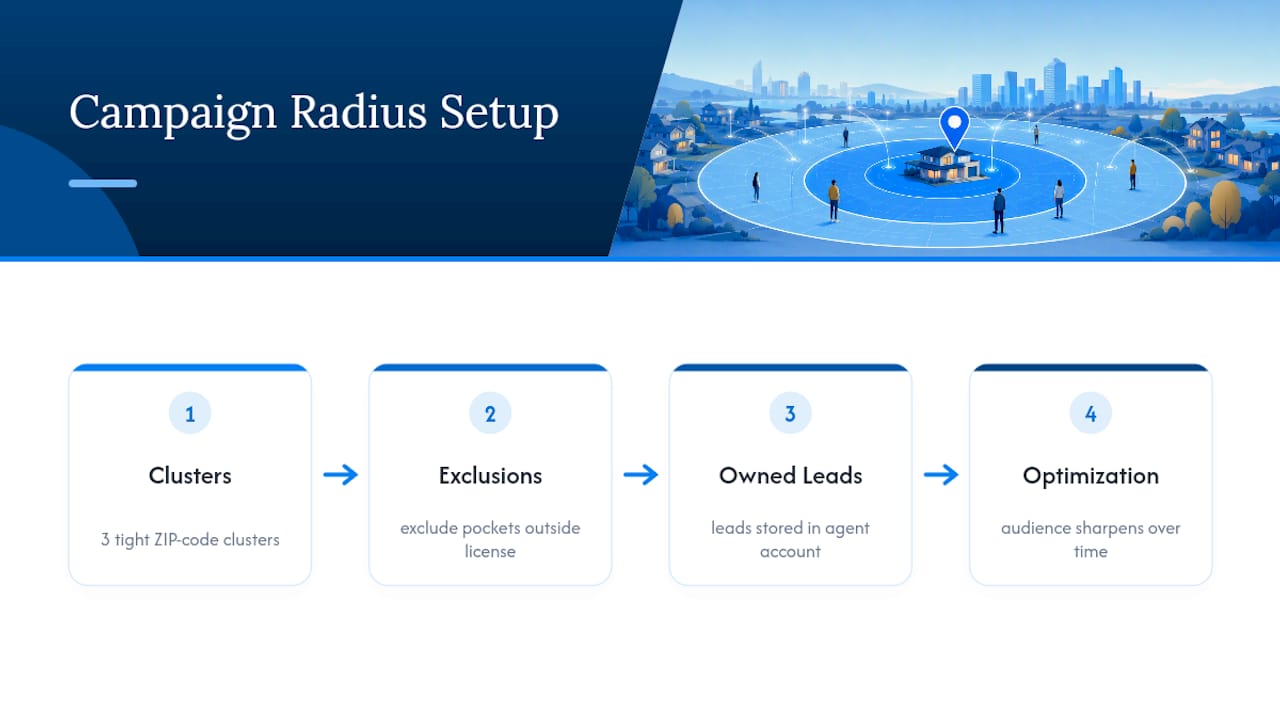
Multi-pin and exclusion setups get used constantly for final expense, IUL, and mortgage protection agents covering county lines or license-restricted service areas. A campaign might run three tight clusters around high-density ZIP codes while excluding a pocket outside a state licensing boundary, keeping the whole setup compliant and efficient at once. Because agents own their leads and their data, every radius adjustment compounds. The audience only gets sharper the longer the campaign runs.
Real-World Radius Targeting Wins Worth Studying
A regional home services company running a 3-mile radius around each of its four branch locations, rather than one large territory-wide circle, saw meaningfully lower cost per lead once it split the coverage into separate ad sets with independent budgets. Each branch’s cluster could be optimized on its own merit instead of one branch’s poor performance dragging down the blended average.
A final expense agent covering a two-county territory found that a single 25-mile radius produced cheap impressions but weak lead quality, largely because the outer edge of the circle overlapped with a lower-income area outside the agent’s typical policy fit. Adding two exclusion pins around that pocket, without shrinking the overall radius, improved lead quality without sacrificing volume.
A mortgage protection campaign built around ZIP code lists instead of a single pin performed better in a market with an irregular service boundary. The agent’s license covered specific counties with an odd shape a circle simply couldn’t replicate, and switching to a ZIP list kept the campaign compliant while still hitting the audience minimum needed for stable delivery. The mortgage protection Facebook ads playbook covers this kind of coverage-shape problem in more detail for agents working irregular territories.
Negotiating Tight-Radius Requests From Clients
Tight radii make sense for agents with a genuinely small service footprint or a retargeting layer already in place. They stop making sense the moment the audience estimate drops near Meta’s minimum and the agent still expects volume.
When a client pushes for a 1-mile radius, I review the audience estimate first, as data supports decision-making better than opinion. Then I lay out the creative plan needed to keep a thin audience from going stale, a frequency cap to prevent burnout, and a retargeting fallback for the browsers who don’t convert on the first pass. Approval only happens once all four boxes are checked.
— Nick
Get Radius Targeting Set Up Right the First Time
Getting radius targeting right takes constant tuning: audience checks, exclusion pins, cluster testing, and CPA tracking by ZIP, on top of everything else running an insurance practice demands. An alternative to buying rented leads is to run campaigns inside your own ad account, with radius strategy, exclusion pins, and multi-location clusters built around a specific licensing territory and policy type, whether that’s final expense, IUL, or mortgage protection.
You keep the leads, you keep the data, and the targeting gets sharper every month instead of resetting every time you buy a new batch. FexAds also publishes state-by-state ad benchmarks so you can see what’s working in your specific market before you commit budget. If you’re ready to see what a radius strategy built around your license and territory could look like, start with an account audit at FexAds and get a custom setup plan back within days.
Where to Verify These Radius Rules Yourself
Every claim about platform limits in this guide traces back to a source you can check directly rather than take on faith.
- Meta’s location targeting documentation covers pin-drop setup, radius units, and cross-border restrictions straight from the source.
- Meta’s audience minimum error guidance explains why tight radii sometimes fail to launch at all.
- The Thread Transfer breakdown on minimum radius strategy covers auction-level behavior Meta doesn’t document publicly.
- Geofencing techniques and exclusion strategy for building multi-pin and Swiss-cheese setups.
Sources
- About location targeting in Meta Ads Manager
- Use Location Targeting: error code 1870194
- Meta Ads Location Targeting: Minimum Radius, Geo Hacks, and Local Strategy | Thread Transfer
Recommended
Want us to run your FE ads?
Two plans from $200 setup. A flat monthly fee from $500 that starts at your first sale.
Apply now