Strategy
US Agents Cut Facebook Insurance CPL With Screening and 60s Response
By Nick Georgalos · 12 min read · Updated 2026-09-23
US Agents Cut Facebook Insurance CPL With Screening and 60s Response ! Agent answering a new insurance lead call The fastest way to reduce Facebook CPL for insurance is to stop optimizing for cheap volume and start screening earlier: use qualifying questions or a landing page, optimize to a qualified-lead event through Conversions API, and call new leads inside 60 seconds.

The fastest way to reduce Facebook CPL for insurance is to stop optimizing for cheap volume and start screening earlier: use qualifying questions or a landing page, optimize to a qualified-lead event through Conversions API, and call new leads inside 60 seconds. Plan for roughly $25 to $45 per form lead and track cost-per-quote and cost-per-bind, not raw CPL. FexAds and its CPL calculator can help you set a defensible number before you spend a dollar.
TL;DR:
- Qualifying questions and landing pages help filter out unqualified leads, making your campaign more cost-effective.
- Optimizing campaigns to a qualified-lead event through Conversions API yields better results than focusing on raw form fills.
- Contact leads within 60 seconds to significantly improve qualification and conversion rates, reducing overall costs.
- Using agent-created video and mobile-first creative improves lead quality more than static ads and should be refreshed every few weeks.
- Working within Meta’s restrictions requires regional targeting, honest category declaration, and avoiding personal-attribute language to prevent ad rejection.
Table of Contents
- Quick Checklist: The 6 Highest-Impact Levers For Lower CPL
- Creative And Messaging That Cut Wasted Clicks
- Lead Form Vs. Landing Page: Which One Lowers Your Real Cost?
- Targeting Rules Inside Meta’s Financial Services Category
- Bidding And Conversion Events: Give Meta The Right Signal
- Speed To Lead: The Automation That Multiplies Every Dollar You Spend
- Metrics That Matter: Calculating Your Allowable CPL
- Compliance Checklist Before You Launch Any Insurance Ad
- Why FexAds’ In-Account, Exclusive-Lead Model Applies These Levers Directly
- A 30-Day Priority Plan
- Get Your Facebook Campaigns Built And Managed By FexAds
- Primary Sources And Further Reading
- Sources
- FAQ
Quick Checklist: The 6 Highest-Impact Levers For Lower CPL
Most agents chase a lower cost-per-lead number and end up with more leads who never answer the phone. These six moves, in order of impact, fix that:
- Pre-qualify in the creative and use a Higher Intent lead form.
- Add 2 to 3 screening questions or route to a landing page suited to the line you sell.
- Optimize to a qualified-lead event through Conversions API, not raw form fills.
- Automate follow-up under 60 seconds with an AI caller and TCPA-safe SMS.
- Add a cost cap once you know your allowable CPL, and test Advantage+ once volume supports it.
- Judge success by cost-per-quote and cost-per-bind, not cost-per-lead alone.
Creative And Messaging That Cut Wasted Clicks
Static image ads with generic “get a free quote” copy still pull clicks, just from the wrong people. Agent-on-camera video explaining who the policy is for and what it costs tends to filter better than a stock photo, and insurance vertical benchmarks consistently show video and mobile-first creative outperforming static assets for insurance offers.
- Test a 30 to 45-second agent video against a benefit-first static ad in the same ad set.
- Build every asset mobile-first; most insurance traffic on Facebook comes from phones.
- Use qualifying language in headlines, like coverage ranges or eligibility windows, without touching age, health, or other protected personal attributes.
- Refresh creative every 2 to 3 weeks to slow ad fatigue and keep CPMs from creeping up.
- Track qualified-lead rate by creative variant, not just click-through rate, and kill the losers fast.
Pro Tip: Run your video and static creative in the same ad set with the same budget for at least three days before judging a winner. Facebook’s delivery algorithm needs that window to stop favoring whichever ad launched first.
Lead Form Vs. Landing Page: Which One Lowers Your Real Cost?
Instant Forms win on volume. They load fast, keep the user inside the app, and pull in more raw leads per dollar. Landing pages win on intent, especially for IUL or mortgage protection buyers who need to understand a bigger financial decision before they hand over a phone number.
- Use Instant Forms for high-volume, lower-consideration offers like final expense.
- Use a landing page when the product needs explanation, like IUL or mortgage protection.
- Test qualifying questions such as desired coverage amount, whether they currently hold a policy, and their renewal timeframe, phrased as neutral options rather than personal statements.
- Switch to the Higher Intent form type, which adds a confirmation screen and filters out accidental taps.
A side-by-side comparison of forms versus landing pages for final expense campaigns shows the pattern clearly: raising CPL through screening usually lowers cost-per-quote, because you’re paying more per lead but wasting fewer of them on people who were never going to answer.
Targeting Rules Inside Meta’s Financial Services Category
Insurance falls under Meta’s Financial Products and Services special ad category, which strips out age targeting, ZIP-code precision, and most detailed-interest targeting that other advertisers rely on. That single restriction is why so many agents see worse CPC and CTR benchmarks in insurance than in almost any other vertical.
- Declare the special ad category honestly; skipping it risks account shutdown, not just ad rejection.
- Build customer-list and lookalike audiences from your own buyers or policyholders where you have compliant consent to use their data.
- Lean on state-level or regional geo targeting plus broad behavioral signals instead of narrow interest stacks.
- Turn on Advantage+ once you have enough conversion volume; Meta’s automated targeting often outperforms manual targeting under these restrictions.
- Keep creative language neutral. Age, health status, and financial hardship references are the fastest way to get an ad rejected or an account flagged.
Bidding And Conversion Events: Give Meta The Right Signal
Optimizing to raw form fills trains Meta’s algorithm to find people who tap forms, not people who buy insurance. The fix, per Meta’s own guidance for life insurance advertisers, is to send a qualified-lead or booked-appointment event back through Conversions API and optimize to that instead.
- Send a “qualified lead” event, not just “lead,” so Meta learns from people who actually passed screening.
- If your qualified-event volume is thin, pool multiple ad sets under one campaign to hit a workable weekly volume.
- Switch to cost-cap bidding only after you know your allowable CPL; guessing on a cap before that wastes spend.
- Start new campaigns with modest test budgets so Meta gathers signal without you overpaying during the learning phase.
Meta’s ad sets generally need roughly 50 optimization events per week to exit the learning phase reliably. Below that threshold, issued-policy events fire too slowly to train the algorithm, which is exactly why a fast-firing qualified-lead event works better as your optimization target than a bind that might not happen for weeks.
Speed To Lead: The Automation That Multiplies Every Dollar You Spend
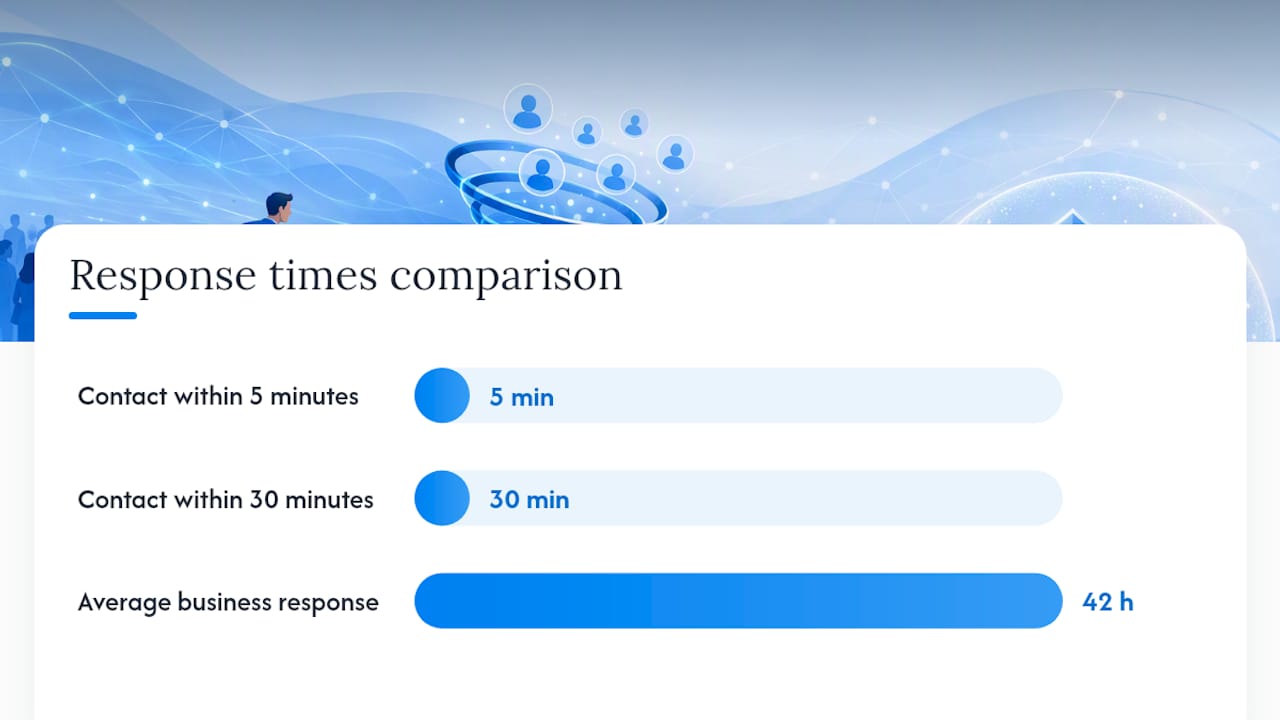
Here’s the number that should change how you run every campaign: contacting a web lead within 5 minutes instead of 30 minutes makes you roughly 21 times more likely to qualify that lead, based on the MIT and InsideSales research summarized by Harvard Business Review. The same audit found the average business takes 42 hours to respond to a lead. That gap is where most Facebook ad budgets quietly disappear.
- Route leads directly from Facebook into your CRM or dialer; never rely on manual CSV exports.
- Trigger an AI caller or click-to-call the moment a lead submits, before intent decays.
- Follow with TCPA-safe SMS if the call goes unanswered, and log consent every time.
- Auto-book confirmed appointments to a calendar so no lead sits in a queue overnight.
Most of the delay agents blame on “bad leads” actually traces back to routing lag: a Zapier step that runs every 15 minutes, or someone manually checking a spreadsheet once a day. Fixing the routing bottleneck before adding headcount is almost always cheaper than hiring another closer to chase leads that already went cold.
Pro Tip: If your current stack has any manual step between “lead submitted” and “phone rings,” that step is costing you more than your CPL ever will.
Metrics That Matter: Calculating Your Allowable CPL
Cost-per-lead tells you almost nothing on its own. What matters is what happens after the lead comes in: your reachable rate (leads you actually contact), your quote rate (contacts who get quoted), and your close rate (quotes that bind). Multiply those together against your CPL and you get the two numbers that actually decide profitability, as the math behind Facebook insurance benchmarking shows: cost-per-quote and cost-per-bind.
| Metric | Formula | Planning Benchmark |
|---|---|---|
| Form-level CPL | Ad spend ÷ form submissions | $25 to $45 |
| Screened/qualified CPL | Ad spend ÷ qualified leads | $25 to $50 |
| Cost-per-quote | Ad spend ÷ quotes delivered | Varies by quote rate |
| Cost-per-bind | Ad spend ÷ policies bound | Set from first-year commission |
Set your allowable CPL by working backward from first-year commission on an average bind, not by copying a benchmark from another agent’s market. Track reachable rate, quote rate, and cost-per-bind on a daily dashboard; a campaign with a rising CPL but a falling cost-per-bind is still winning.
Compliance Checklist Before You Launch Any Insurance Ad
A rejected ad or a TCPA complaint costs more than a slightly higher CPL ever will.
- Declare the Financial Products and Services special ad category on every campaign.
- Capture and timestamp consent for calls and texts at the point of lead submission.
- Keep landing page disclaimers and ad copy consistent; a mismatch is a common rejection trigger.
- Avoid any personal-attribute language (age, health, financial hardship) in copy or creative.
- Confirm Conversions API is firing correctly and form fields match your CRM before you spend a dollar on traffic.
Why FexAds’ In-Account, Exclusive-Lead Model Applies These Levers Directly
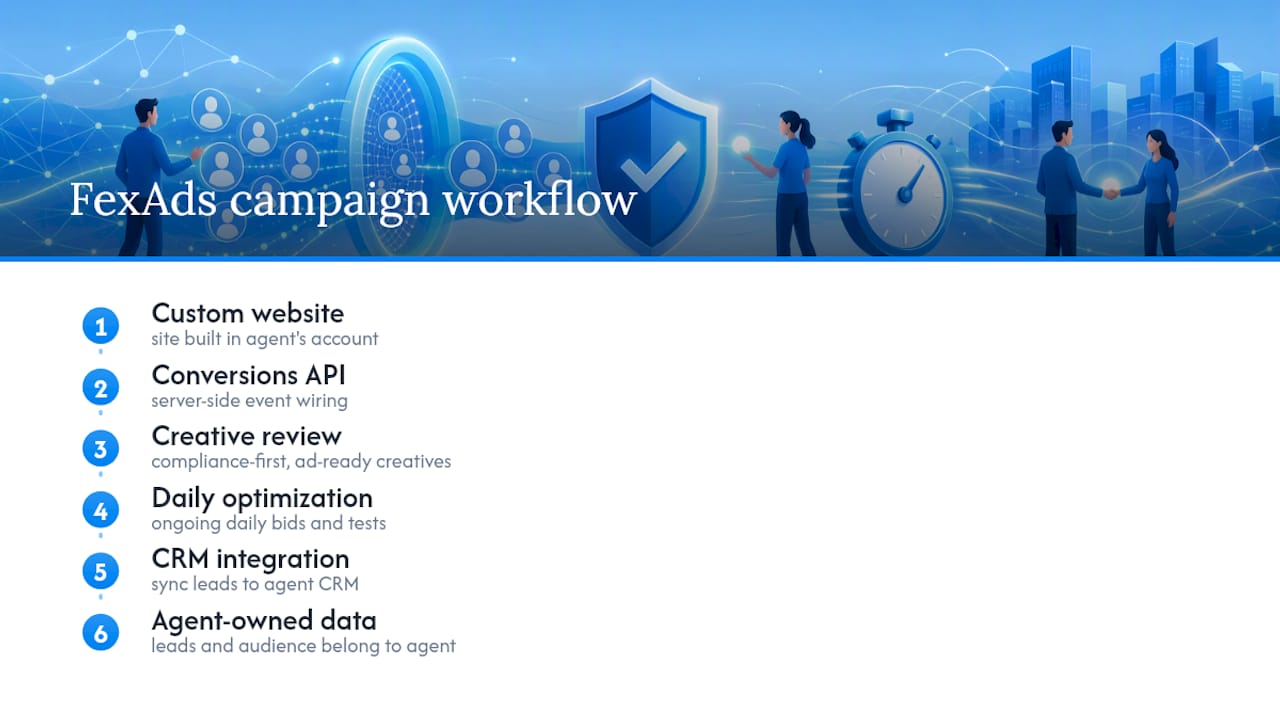
FexAds builds and manages these campaigns inside the agent’s own ad account, so every lead and every audience insight belongs to that agent, not a shared pool. Setup includes a custom website, Conversions API wiring, and compliance-first creative review, followed by ongoing daily optimization and CRM integration. Agents who want to model their own numbers before committing spend can run scenarios through the Facebook ad CPL calculator to see what an allowable CPL actually looks like for their state and product line.
A 30-Day Priority Plan
Start with a 7 to 14 day test pitting one screened lead form against one landing page, and wire up real-time lead capture with automated follow-up on day one, not week three. Keep the ad budget conservative and judge results by cost-per-quote after 2 to 3 weeks, not by CPL alone. If qualified-event volume stays thin past that window, pool your ad sets or consider a managed service built for exactly this problem.
— Nick
Get Your Facebook Campaigns Built And Managed By FexAds
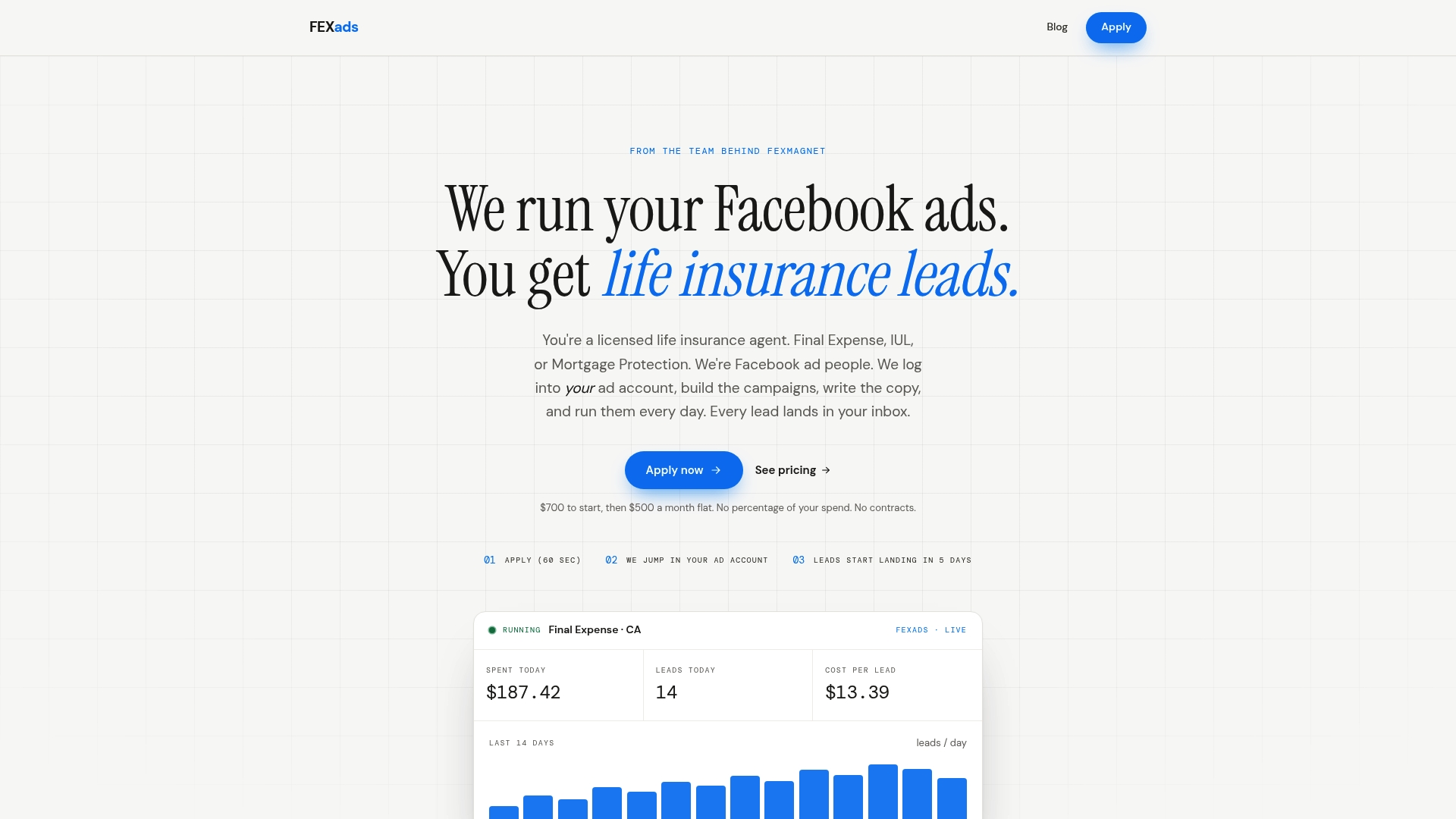
Fexads runs these campaigns directly inside your own ad account, which means the exclusive leads and the audience data they generate stay yours, not shared with three other agents in your area. Setup is a one-time $700 fee, followed by $500 per month for ongoing management, covering campaign builds, a custom website, pixel and Conversions API wiring, compliance checks, and daily optimization.
If you want to see what an allowable CPL looks like before you commit spend, run your numbers through the CPL calculator first. When you’re ready to move, apply for management and Fexads will set up the account, build the funnel, and start running it.
Primary Sources And Further Reading
- Harvard Business Review’s audit of lead response times, covering the MIT/InsideSales speed-to-lead research.
- Insurance-specific Facebook benchmarks on CPL ranges and CTR.
- Scale Growth Digital’s breakdown of screening questions and cost-per-quote math.
- Elevarus’s guide to Meta’s special ad category rules for life insurance.
- Coldcalls on routing delays and automation fixes.
- A broader primer on lead generation funnels for agents new to paid funnel measurement.
This article is general information, not a substitute for advice from a qualified financial advisor. Consult a qualified financial professional about your own circumstances before acting on anything here.
Sources
- The Short Life of Online Sales Leads — Harvard Business Review (audit summary)
- Facebook & Meta Lead Ads for Insurance Agencies (2026)
- Facebook Ads for Insurance: Lead Gen Strategy - Scale Growth Digital
- Meta ads for life insurance leads (2026)
FAQ
How Do You Reduce CPL On Facebook Ads?
Screen leads earlier with qualifying questions or a landing page, optimize your campaign to a qualified-lead event instead of raw form fills, and follow up within 60 seconds so intent doesn’t decay. These three changes typically lower your cost-per-quote even when raw CPL rises slightly, based on screening trade-off data from Scale Growth Digital.
Why Is My CPC So High On Facebook For Insurance Ads?
Insurance sits in Meta’s Financial Products and Services special ad category, which restricts targeting and pushes CPCs above most other industries’ benchmarks. Stale creative and broad, unscreened targeting make it worse, so refreshing ads and tightening your audience through lookalikes usually brings CPC back down.
What Is A Good CPL For Meta Insurance Ads?
Plan for roughly $25 to $45 per form-level lead in many U.S. markets, and $25 to $50 for screened or qualified leads that have already answered a few questions. The right number for your business depends on your quote rate and close rate, which is why cost-per-bind matters more than the raw CPL figure.
How Do You Calculate Allowable CPL For Insurance Leads?
Work backward from your first-year commission on an average bind, then divide by your reachable rate, quote rate, and close rate to find the CPL you can afford while staying profitable. Tools like the FexAds CPL calculator can run this math for your specific product line and state.
Recommended
Want us to run your FE ads?
$700 to launch, custom website included. $500 a month flat after that.
Apply now