Strategy
4 Ways Insurance Agents Track Facebook Ad Calls With DNI and CAPI
By Nick Georgalos · 14 min read · Updated 2026-09-15
4 Ways Insurance Agents Track Facebook Ad Calls With DNI and CAPI ! Insurance agent qualifying a tracked phone call The most reliable way to track phone-call conversions from Facebook ads is Dynamic Number Insertion tied to server-side Conversions API.

The most reliable way to track phone-call conversions from Facebook ads is Dynamic Number Insertion tied to server-side Conversions API. Use dedicated tracking numbers or a pixel-plus-Google Tag Manager click-to-call setup only as fallbacks. Whichever path you pick, qualify every call by answered status and a minimum duration before you tell Facebook it has counted.
TL;DR:
- Dynamic Number Insertion combined with server-side Conversions API is the most accurate method, as it links specific ads to qualified calls and survives iOS restrictions.
- Using dedicated tracking numbers provides general campaign attribution but cannot distinguish which ad within a campaign generated a call, making it less effective for detailed analysis.
- Pixel plus Google Tag Manager can track click-to-call events but does not verify if a call was connected or qualified, leading to potential overestimation.
- Properly setting and testing call qualification rules, like answered calls exceeding 60 seconds, is critical for meaningful optimization rather than relying solely on click or call confirmation metrics.
- Regular testing of the full tracking setup and ensuring proper
fbclidpreservation is essential to maintain accurate attribution and avoid data gaps.
Table of Contents
- How Do You Track Phone Calls From Facebook Ads?
- Setting Up Dynamic Number Insertion With Server-Side Conversions API
- Using Dedicated Tracking Numbers for Simpler Attribution
- Firing Click-to-Call Events With Pixel and Google Tag Manager
- Measuring Call Quality So Your Optimization Data Actually Works
- Testing and Troubleshooting Your Call Tracking Setup
- What FexAds Has Learned Running Call-First Campaigns for Insurance Agents
- The Real Lesson Buried in Call Tracking Advice
- Get Your Call Tracking Stack Built and Running
- Sources
- FAQ
How Do You Track Phone Calls From Facebook Ads?
Four methods dominate this space, and they are not interchangeable. Each one trades effort against data quality, and the gap between the best and worst option is bigger than most advertisers realize.
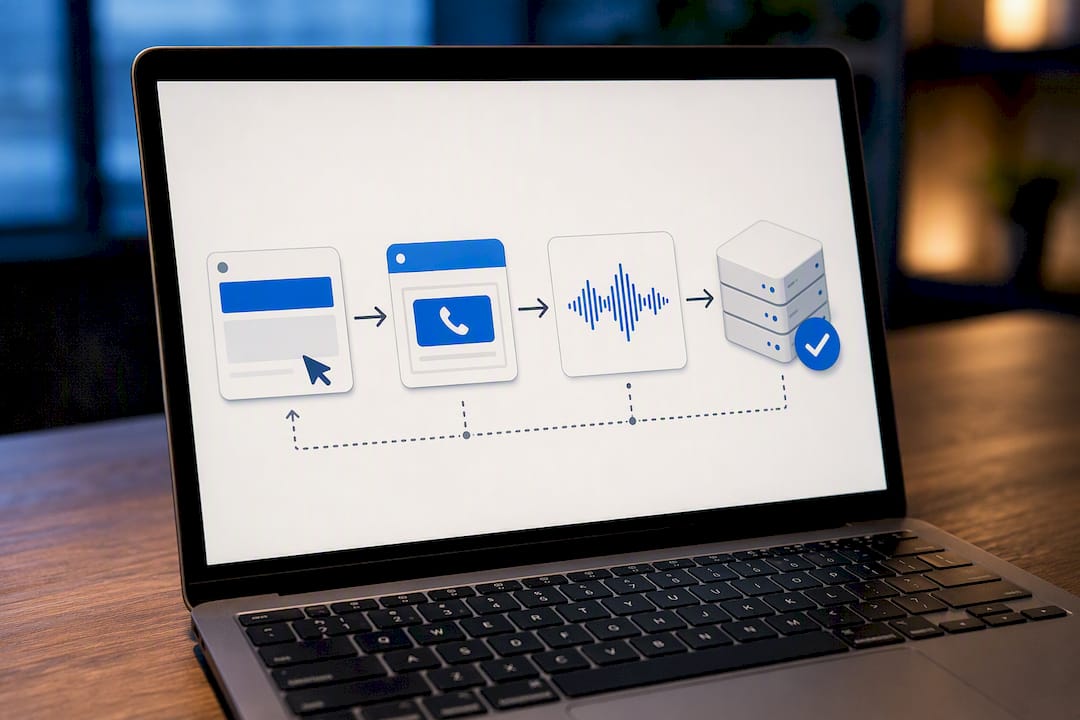
Dynamic Number Insertion (DNI) paired with server-side Conversions API is the gold standard. A call-tracking script swaps in a unique phone number for each visitor, captures that session’s fbclid, and once the call happens and gets qualified, a call-tracking provider fires the event to Facebook via server-side Conversions API. This is the only method that ties a specific ad, ad set, and creative to a specific connected call, and it survives iOS tracking restrictions because it does not depend on a browser cookie surviving the trip.
Dedicated tracking numbers assign a distinct phone number to each campaign or ad set, sometimes through call extensions. You get campaign-level attribution without writing code, but you lose click-level precision. Two visitors from the same ad share one number, so you cannot separate which ad set or creative closed which call.
Pixel plus Google Tag Manager fires a Facebook Pixel custom event when someone taps a tel: link. It’s fast to set up and free, but a click is not a call. Someone can tap and hang up, misdeal, or never actually speak to anyone, and the pixel has no idea.
Facebook Call Ads use Meta’s built-in call button objective, which reports “call confirmation clicks” in Ads Manager. That metric only confirms a tap, not a connected or qualified conversation, which is exactly the trap most advertisers fall into.
Choosing between them comes down to resources:
- Solo agents or small shops: start with a dedicated tracking number and layer in Pixel/GTM tracking for a directional read.
- Anyone spending real budget on cost-per-lead campaigns: DNI plus CAPI is worth the setup time within the first month, because Facebook’s optimization only gets smarter once it sees real outcomes.
- Teams with a CRM already in place: DNI integrates with most call-tracking platforms and CRMs with minimal custom development.
Setting Up Dynamic Number Insertion With Server-Side Conversions API
DNI works because it captures the fbclid parameter attached to every Facebook ad click and holds onto it for the length of that visitor’s session. When a call comes in on the dynamically assigned number, your call-tracking provider already knows which fbclid, which landing page, and which ad drove that visit. That’s the piece Facebook’s own click reporting can never give you on its own.
Here’s the build:
- Install the DNI snippet from your call-tracking provider (options include CallScaler, CallRail, and similar platforms) on every landing page that runs Facebook traffic.
- Provision a pool of dynamic numbers large enough that no two simultaneous visitors get the same number and confuse attribution.
- Capture and preserve the
fbclidin session or local storage the moment the page loads, and make sure no redirect or intermediate page strips that query string before the DNI script sees it. - Connect your call-tracking provider to a CRM or dealer so call metadata (duration, answered status, disposition) flows somewhere you can query it.
- Map the event fields for CAPI:
event_name(Lead or Call),event_time, hasheduser_data(phone or email), andcustom_datacontaining call duration, call status,fbclid, and the landing page URL. - Send the event server-side only after the call clears your qualification rule, not the moment the phone rings.
A workable qualification rule looks like: answered, plus at least 60 seconds of talk time. Some agencies add a layer of AI call scoring on top of that to catch calls that hit 60 seconds but never actually discuss coverage.
Once calls are qualifying and mapping correctly, build the custom conversion in Events Manager, name it something specific like “Qualified Call 60s+,” and set your campaign’s optimization event to that conversion instead of the generic call-button click. This is the step most advertisers skip, and it’s the one that actually changes what Facebook’s delivery algorithm chases.
Pro Tip: Use a consistent deduplication ID across your pixel and server events for the same action. Without it, Facebook can double-count a call that fires from both the browser pixel and your server-side CAPI call, inflating your reported conversions.
Test the full loop before you trust it: click a live ad, land on the page, confirm the dynamic number displayed matches your pool, place a test call past the duration threshold, then check Events Manager for the matching event within a few minutes.
Using Dedicated Tracking Numbers for Simpler Attribution
If a full DNI build feels like overkill for your current spend, a dedicated tracking number gets you campaign-level visibility without touching code. You buy or provision a phone number per campaign, sometimes per ad set, and route every call from that source through it.
Setup is straightforward:
- Purchase a tracking number through your call-tracking provider or phone system.
- Swap the number into your ad’s call button, call extension, or landing page for that specific campaign.
- Route incoming calls to your normal answering flow, but log the source number against every call.
- Pull weekly call logs and match volume and timing against your ad spend and click data for a rough read on which campaign is generating the activity.
The limitation is obvious once you scale past two or three active campaigns: you know a call came from “Campaign A,” but not which ad, audience, or creative within that campaign drove it. Advertisers often patch this with time-window matching, cross-referencing the call’s timestamp against Ads Manager’s hourly breakdown to guess at the source ad, but that’s an estimate, not attribution.
This method is adequate for agents running one or two offers with modest budgets who mainly want to know whether Facebook, direct mail, or referrals are producing the calls. The moment you’re running multiple creatives simultaneously and need to know which hook is actually converting into phone leads, it’s time to move to DNI plus CAPI.
Firing Click-to-Call Events With Pixel and Google Tag Manager
This method tracks the click, not the conversation, and that distinction matters for how you use the data. It’s still worth having as a supplementary signal, especially while you’re building out a heavier tracking stack.
- In Google Tag Manager, create a trigger that fires on click for any link starting with
tel:. - Build a tag that fires the Facebook Pixel’s custom event (something like
PhoneCallClick) whenever that trigger activates. - In Events Manager, create a custom conversion built from that Pixel event, and use it as a secondary optimization or reporting event rather than your primary one.
- Layer in post-call verification. Match the click timestamp against your call log later so you’re not treating every click as a real lead.
Test it with Meta’s Pixel Helper browser extension to confirm the event fires when you tap the link yourself, then check Events Manager’s test events tab to see it register within a minute or two. If it doesn’t show up, check for a script blocker or an ad blocker suppressing the pixel call, which is a common false negative in this setup.
Measuring Call Quality So Your Optimization Data Actually Works
Facebook’s “call confirmation click” metric tells you someone tapped a button. It does not tell you whether that person got a busy signal, sat on hold, or hung up after five seconds, which is why treating that number as a conversion count misleads your optimization. Every qualified call event you send back to Facebook should carry a handful of fields: answered status, call duration, agent disposition, and ideally an estimated value.
A workable qualification rule most call-tracking vendors recommend: answered, plus a minimum duration like 60 seconds, plus an agent disposition marking real interest, or an AI-based scoring layer that flags calls worth counting. Anything short of that gets excluded from what you send back through CAPI or as an offline conversion.
Once qualified outcomes are flowing back into Facebook, track these reports weekly:
- Cost per qualified call, not cost per click-to-call
- Call-to-sale conversion rate
- Average call duration by ad set and creative
- Time-to-call from ad click to phone ring
One compliance note worth repeating here: never reach for a device-monitoring or spy app to fill gaps in your data. Facebook’s own guidance draws a hard line between legitimate marketing attribution and device-level monitoring tools, and mixing the two creates both a policy risk and, depending on your state’s telemarketing and recording laws, a legal one.
Testing and Troubleshooting Your Call Tracking Setup
Run this sequence any time you launch a new campaign or touch your tracking stack:
- Click your live ad from a fresh browser session (not logged into your own Facebook account).
- Confirm the landing page loads with the dynamic number or tracking number displayed correctly.
- Place a test call and let it run past your qualification threshold.
- Check Events Manager’s test events tool for the matching Lead or Call event within a few minutes.
- Cross-check the event’s
custom_datafields, especiallyfbclid, to confirm it matches the session that generated the click.
Meta’s Pixel Helper extension and your call-tracking vendor’s own event logs are your two fastest diagnostic tools. Most failures trace back to one of four things: a stripped fbclid from an intermediate redirect page, a browser extension blocking the pixel script, a timezone mismatch between your call log and Facebook’s reporting window, or a misrouted dynamic number pointing to the wrong campaign pool.
Pro Tip: After any landing page redesign, rerun the full test sequence before trusting the day’s data. A single template change can silently strip the fbclid parameter and quietly break attribution for every campaign running through that page.
What FexAds Has Learned Running Call-First Campaigns for Insurance Agents
Running Facebook campaigns for licensed final expense, IUL, and mortgage protection agents has made one thing clear: server-side signals through Conversions API hold up noticeably better than pixel-only tracking once privacy restrictions tighten. Agents who send Facebook only qualified call events, typically answered calls past 60 seconds combined with an agent disposition, tend to see the algorithm settle into a lower cost per qualified call within a few weeks of switching from click-based optimization.
The bigger structural point matters just as much as the tracking stack. Owning your own ad account and lead data, rather than working from rented leads shared across multiple agents, means every qualified call event improves your account’s targeting over time. That compounding effect is the real payoff of getting call tracking right, not just cleaner reporting.
The Real Lesson Buried in Call Tracking Advice
Most guides on this topic treat call tracking as a technical checklist: install this snippet, map these fields, done. That’s backwards. The setup is the easy part. The rule that decides what counts as a “qualified” call is where campaigns actually succeed or fail, and it’s the part almost every advertiser skips or sets carelessly.
Set your duration threshold too low, say 15 or 20 seconds, and you’re feeding Facebook a pile of voicemails and hang-ups disguised as conversions. The algorithm will happily chase more of exactly that. Set it too high, and you might exclude short but genuinely qualified calls where a prospect asked one question and booked an appointment.
There’s no universal number here, but 60 seconds combined with an agent disposition is a defensible starting point for most phone-driven lead flows, and it’s worth testing against your own close rate before you lock it in. The advertisers getting the best results aren’t the ones with the fanciest tech stack. They’re the ones who treat the qualification rule as a living decision they revisit every month, not a setting they configure once and forget.
— Nick
Get Your Call Tracking Stack Built and Running
A service is available that builds this exact stack for insurance agents who’d rather sell policies than debug fbclid parameters. A typical engagement covers pixel and Conversions API setup, DNI or dedicated number deployment depending on your call volume, call qualification rules tuned to your close rate, and daily campaign optimization once qualified events start flowing.
The process runs in four stages: an audit of your current ad account and tracking setup, the technical build (pixel, CAPI, number provisioning), a testing phase to confirm events are landing correctly in Events Manager, and then ongoing management as the algorithm learns from real call outcomes. Every lead generated lands in your own ad account, not a shared pool, so your targeting keeps improving the longer you run. Check FE Facebook Ads by State to see what a managed setup looks like for your market, and get in touch to start the audit.
FAQ
Can a Facebook call be traced?
A call made through Facebook Messenger itself isn’t traced back to a phone number the way a cellular call is, but a call generated from a Facebook ad’s call button can be traced to the specific ad click using Dynamic Number Insertion and a captured fbclid.
Can you see Facebook calls on phone records?
Standard carrier phone records won’t show a Facebook Messenger voice or video call since it runs over internet data, not the cellular network, though your data usage will reflect the app activity.
Can Facebook Messenger phone calls be traced?
Messenger calls are encrypted in transit, and Meta does not provide advertisers or third parties a way to trace or monitor another user’s Messenger call content or logs.
How can you tell if someone is tracking your Facebook activity?
There’s no reliable built-in feature that shows you who is monitoring your account activity, and any third-party app claiming to reveal this should be treated skeptically since Meta’s own guidance warns against device-monitoring tools entirely.
Recommended
Want us to run your FE ads?
$700 to launch, custom website included. $500 a month flat after that.
Apply now