Strategy
First Hour Facebook Ad Comment Moderation for Agents with 4 Buckets
By Nick Georgalos · 12 min read · Updated 2026-09-13
First Hour Facebook Ad Comment Moderation for Agents with 4 Buckets ! Agent reviewing Facebook ad comments To protect ad delivery and conversions, moderate comments in the first hour with Meta Business Suite or Ads Manager, a keyword blocklist, and a simple triage habit: hide spam, answer buying questions in public, and move complaints to a direct message.

To protect ad delivery and conversions, moderate comments in the first hour with Meta Business Suite or Ads Manager, a keyword blocklist, and a simple triage habit: hide spam, answer buying questions in public, and move complaints to a direct message. Run at least one daily sweep after that. Once volume outpaces one person’s attention, layer in automation or managed support.
TL;DR:
- Moderate comments intensively during the first hour after the ad launches to boost engagement signals and prevent spam buildup that can harm ranking.
- Use Meta’s Business Suite Inbox for a comprehensive view of all campaign comments and utilize the keyword blocklist to auto-hide spam before anyone sees it.
- Default to hiding comments that are spam or irrelevant, and reserve deletion for content that directly violates community standards or legal policies.
- Implement a four-bucket system to quickly sort comments into hide, reply, ignore, or escalate, prioritizing purchase questions and genuine complaints for fast response.
- Automate filtering with native tools and AI for high-volume ad accounts, but ensure a human reviews ambiguous comments to maintain tone and accuracy.
Table of Contents
- What Native Meta Tools Handle Facebook Ad Comment Moderation?
- What’s the Right Workflow for Moderating Comments in the First Hour?
- How Does Automation Change Ad Comment Filtering at Scale?
- What Is the 4-Bucket System for Sorting Ad Comments?
- What FexAds Has Learned Running Comment Moderation for Agents
- When Should an Agent Hand Off Comment Moderation to a Managed Service?
- A Publisher’s Take on Where Moderation Actually Moves the Needle
- Where to Verify These Moderation Details
- Sources
- FAQ
What Native Meta Tools Handle Facebook Ad Comment Moderation?
Two dashboards do the actual work, and they behave differently enough that mixing them up wastes time. The Business Suite Inbox has an “Ads” tab that pools comments across every active campaign in one feed, which is where you should live day to day. Ads Manager’s “View Comments” option sits inside each individual ad, which is faster when you’re already troubleshooting one specific campaign rather than scanning everything at once.
The profanity filter and keyword blocklist do the heavy lifting behind the scenes. Meta’s own guidance recommends turning on proactive moderation features like word blocking and profanity filters rather than relying on manual review alone. Page admins can load up to 1,000 custom keywords, phrases, or emojis into a blocklist, and any comment matching a term gets auto-hidden before a human ever sees it. Add competitor names, slurs, obvious scam phrases, and anything specific to your policy language.
Hide and delete are not the same action, and picking the wrong one has consequences.
- Hiding a comment removes it from public view for everyone except the commenter and their friends. It looks normal to the person who wrote it, so it rarely provokes a second angry post.
- Deleting removes the comment entirely for all users, which can read as censorship if the original comment was a legitimate complaint rather than spam.
- Default to hiding for spam, scams, and low-value noise. Reserve deletion for content that violates Community Standards outright, like hate speech or explicit threats.
One more mechanic worth knowing: Meta ranks comments by relevance, not strictly by time. Ranking signals include spam flags, reports, hides, and commenter history, so a buried complaint from three hours ago can resurface at the top if it starts getting engagement. That’s exactly why a single morning check isn’t enough on an active campaign.
What’s the Right Workflow for Moderating Comments in the First Hour?
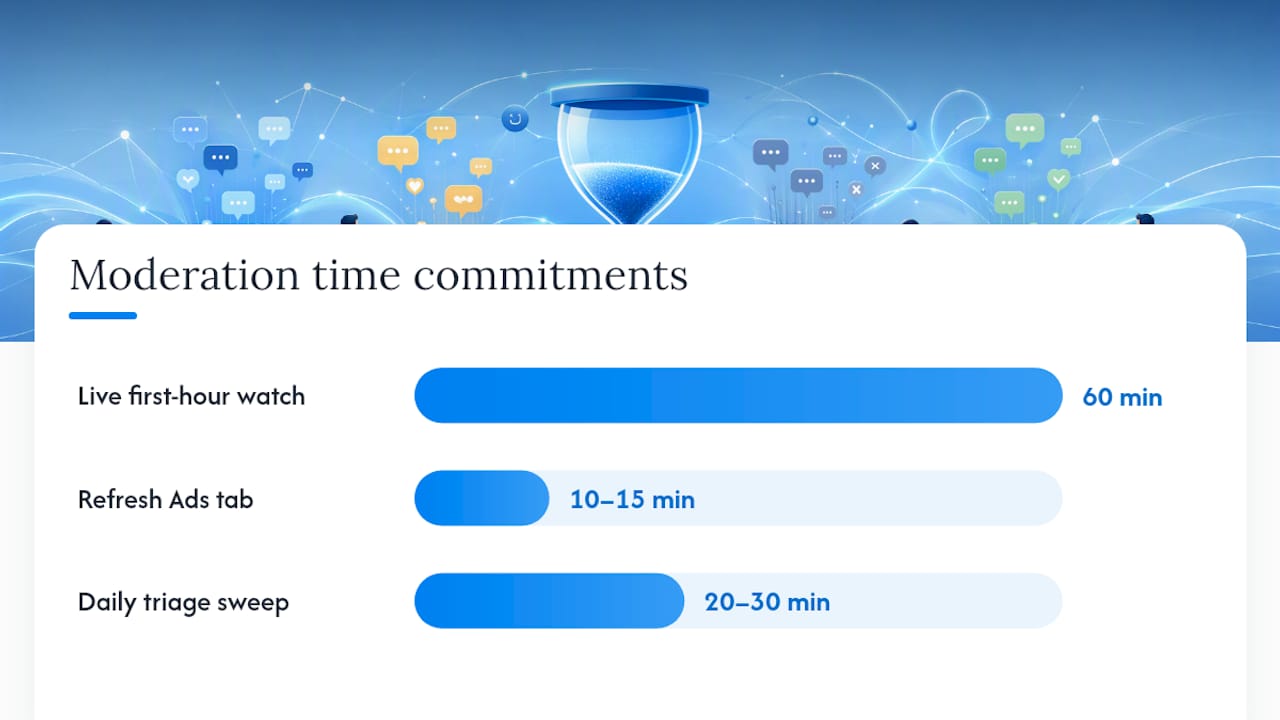
The first 60 minutes after an ad goes live matter more than any other window in the campaign. Early replies signal to both prospects and Meta’s own ranking system that the ad is active and worth engaging with, and industry reporting ties fast first-hour responses to stronger overall ad performance. Ignore that window and a spam flood or an unanswered complaint can sit at the top of the thread for hours.
Here’s the sequence that actually works:
- Watch the thread live for the first hour. Refresh the Ads tab every 10 to 15 minutes rather than setting it and walking away.
- Hide spam and bot comments immediately. Anything with a link, an emoji string, or an obviously scripted phrase gets hidden on sight.
- Answer purchase-intent questions in public, fast. “How much does this cost?” or “Do you serve my zip code?” deserves a real, specific answer within the hour, not a generic “DM us.”
- Acknowledge complaints publicly, then pivot to DM. A short, human reply followed by a private conversation resolves the issue without airing it for every future viewer.
- Amplify genuine praise with a reply or a like. It costs nothing and it’s social proof for the next person reading the thread.
After launch day, the routine shrinks to a daily sweep. Practitioner guidance pegs moderate comment volume at roughly 20 to 30 minutes of daily triage: clear the Ads inbox, flag anything that needs escalation, hide new spam, and note recurring complaints so your creative or offer team can address the root cause instead of just the symptom.
A few reply templates save real time once you are moving fast:
- Purchase question: “Great question! [Specific answer]. You can also check availability here: [link].”
- Complaint: “Sorry to hear that, [name] — we want to make this right. Sending you a DM now so we can sort it out.”
- Positive comment: “Thanks so much, [name]! Glad to hear it’s working for you.”
When in doubt on hide versus delete versus escalate, use this rule: hide anything that’s noise, delete anything that violates policy outright, and escalate anything involving a legal threat, a media mention, or a comment thread that’s picked up unusual engagement velocity.
Pro Tip: Keep a running document of every complaint pattern you see for a week. If three people ask the same question or raise the same objection, that’s a signal for your ad copy, not just your inbox.
How Does Automation Change Ad Comment Filtering at Scale?
Native filters catch the obvious stuff. Keyword blocklists and the profanity filter handle known bad words and phrases reliably, but they can’t judge tone, sarcasm, or a complaint phrased without any trigger word. That’s the ceiling of what Meta’s built-in tools do on their own.
Automation beyond the native filter generally falls into three buckets:
- Auto-hide rules that extend beyond a static keyword list, catching link patterns or repeated phrasing common to spam campaigns.
- Auto-replies for FAQs, useful for high-volume ads where the same three questions account for most of the comment traffic.
- AI triage systems that don’t reply on their own but flag, sort, and prioritize comments for a human, separating “needs a reply now” from “can wait” without anyone reading every single line.
Third-party tools earn their cost once native tools stop keeping up. Consolidated inboxes and workflow automation across multiple ad accounts matter most when you’re running more than a handful of active campaigns simultaneously, need a documented response SLA, or manage comments across Facebook alongside Instagram and other channels in one place.
A few triggers signal it’s time to add tooling:
- You’re running several ad accounts and switching between them eats more time than the moderation itself.
- Comment volume regularly exceeds what one person can review inside 30 minutes a day.
- You’ve committed to a response-time SLA that manual checking can’t reliably hit.
Whatever you automate, keep a human reviewing anything ambiguous. Automation should prioritize catching obvious spam and scam links while routing gray-area comments to a person, because an auto-reply written in the wrong tone to a genuine complaint does more damage than a slow human response would. Measure whether the tool is actually saving time by tracking your average response time before and after you adopt it. If it isn’t moving, the tool isn’t earning its cost.
What Is the 4-Bucket System for Sorting Ad Comments?
Every comment on a running ad falls into one of four buckets, and sorting them fast is the entire point of a triage system. This structure comes straight from practitioner workflow guidance built around scaling moderation without adding headcount for every new campaign.
- Hide: Spam, bot links, off-topic noise, and anything that adds nothing to the thread. No reply needed, just remove it from view.
- Reply: Purchase questions, objections worth answering, and genuine praise. This bucket gets the fastest attention because it directly touches conversion.
- Ignore: Low-engagement chatter that isn’t hurting anything and doesn’t need a response. Tagging every joke or unrelated comment wastes time better spent elsewhere.
- Escalate: Legal threats, accusations of fraud, comments that reference a regulatory issue, or anything that could turn into a press problem if left alone.
Recommended response windows differ by bucket. Purchase-intent questions deserve a prompt answer while the ad is actively spending. Complaints should get a timely public acknowledgment, even if the real resolution happens later in DM. Escalations need eyes as soon as possible, since a delayed response on a legal or compliance issue compounds the problem.
For ownership, a single shared inbox with tags beats splitting comments across multiple people’s individual logins. Tag each comment by bucket as it’s reviewed, assign escalations to a named person, and keep one thread of accountability instead of three people assuming someone else already answered.
Track these KPIs weekly to know whether the system is working:
- Average response time by bucket
- Percentage of comments hidden versus deleted (a rising delete rate can signal a policy problem worth investigating)
- Escalations per week
- Total moderation minutes per active ad
What FexAds Has Learned Running Comment Moderation for Agents
Every FexAds campaign generates leads exclusively inside the agent’s own ad account, which means the agent, not a lead vendor, controls the comment thread and everything said in it. That ownership matters because final expense and mortgage protection ads draw heavy comment volume, much of it price questions that need a fast, accurate answer to convert — see this content moderation workflow for creator campaigns for practical playbook guidance.
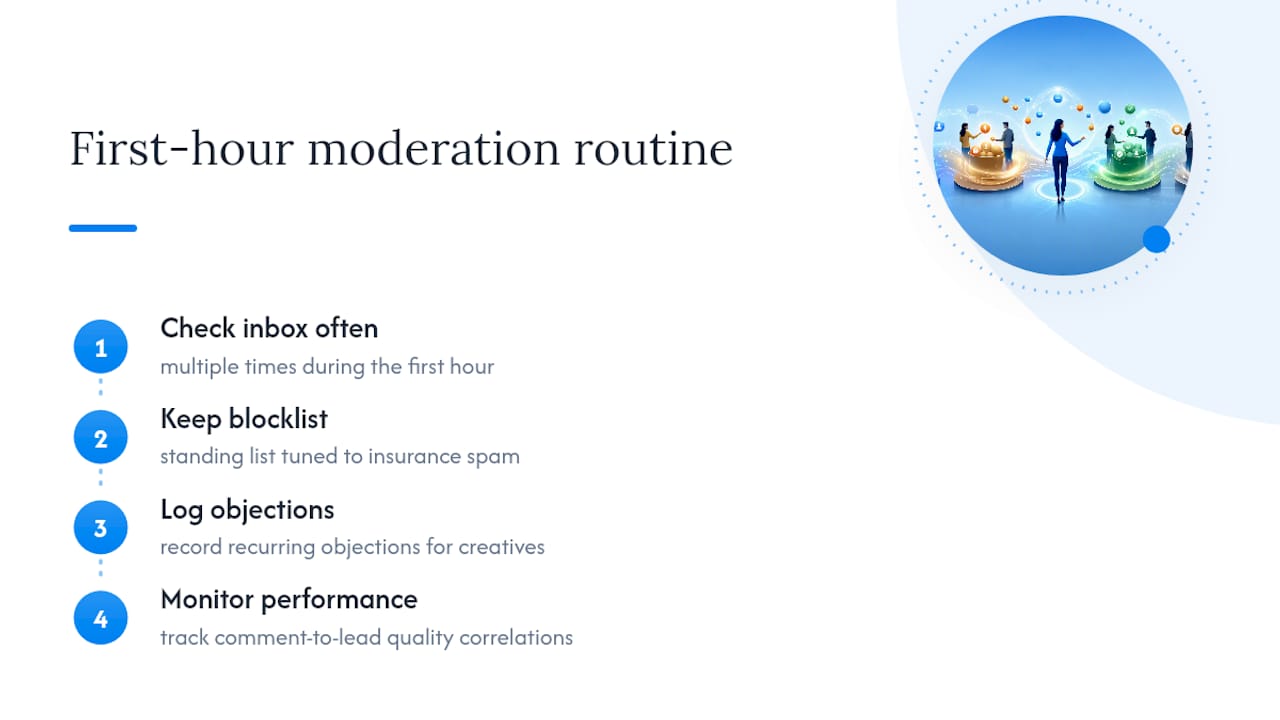
A managed routine typically means checking the inbox multiple times during the first hour of any new campaign, keeping a standing blocklist tuned to insurance-specific spam, and logging recurring objections so the next creative refresh addresses them directly. Real-time performance insights help agents see which comments correlate with actual lead quality over time.
When Should an Agent Hand Off Comment Moderation to a Managed Service?
DIY moderation works fine at low comment volume with one or two active ads. It stops working once you’re running campaigns across multiple states, juggling compliance language specific to final expense or IUL products, and trying to hit a response SLA between client calls. That’s the point where moderation becomes a second job instead of a five-minute daily task.
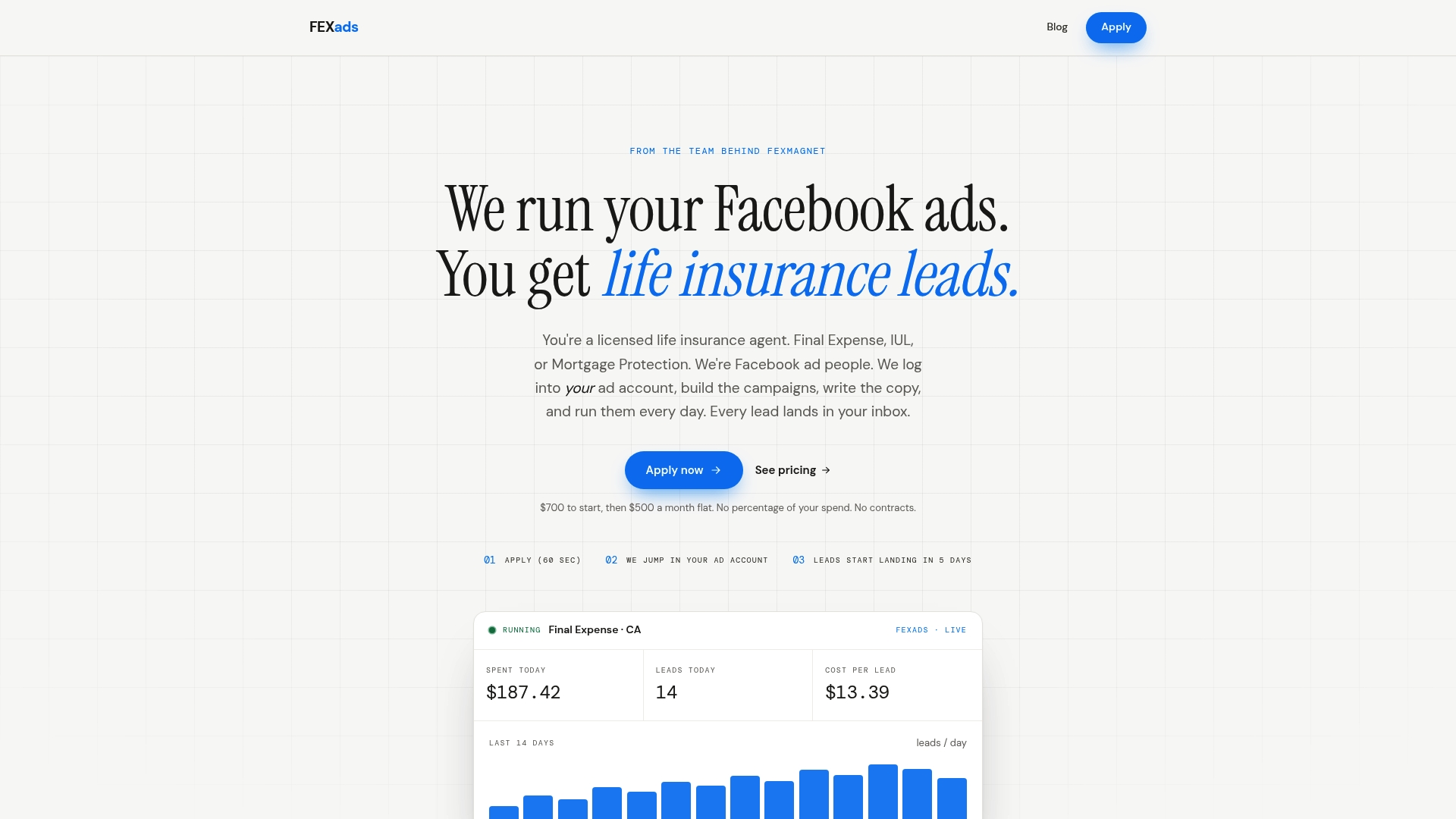
Comment moderation can be part of daily management for Facebook ad campaigns in the licensed life insurance agent niche. Every lead generates inside your own ad account, so you own the data and the audience insights that build over time instead of renting access to leads shared with other agents. Campaigns may include creative development, compliance checks, optimization, audience targeting, and pixel setup to enhance comment activity. If you’re an agent tired of buying rented leads and want exclusive leads generated in an account you control, see how Fexads builds and manages your Facebook ad campaigns and check whether your state has a dedicated setup at the FE Facebook Ads by State page.
A Publisher’s Take on Where Moderation Actually Moves the Needle
Fast, visible public replies do more for conversion than most agents assume. A prospect scanning the comments sees whether questions get real answers, and that shapes trust before anyone clicks through. Automating every reply strips out the tone that makes those answers land, so keep a person reviewing anything beyond routine spam. Track your response times monthly and adjust the system instead of assuming it’s set for good.
— Nick
Where to Verify These Moderation Details
For the official mechanics, start with Meta’s own documentation on managing comments in Ads Manager and its comment moderation best practices. Meta’s transparency site explains how comment ranking actually works, and for account setup specifics, see the Meta Business Manager glossary entry.
Sources
- Manage comments on your ads in Meta Ads Manager (Meta Business Help)
- Helpful tools to manage and moderate Facebook conversations (Social Media Examiner)
- 8 tactics for handling negative Facebook comments (MarTech)
FAQ
What Is the 20% Text Rule for Facebook Ads?
Meta previously limited image ads to roughly 20% text coverage, but that rule was retired years ago; ads with heavy text can still run, though very text-dense creatives may see reduced delivery in some cases.
Can You Prevent Comments on Facebook Ads?
You can turn off commenting entirely on a specific ad through Ads Manager, but most advertisers prefer to keep comments open and moderate them actively, since public questions and praise can boost conversion when handled well.
What Does It Mean to Moderate Comments?
Moderating comments means actively reviewing, hiding, replying to, or escalating what people post on your content, using tools like a keyword blocklist and a consistent triage routine rather than letting the thread run unchecked.
Can I Restrict Comments on a Facebook Post?
Yes. Page admins can restrict who comments on a specific post or ad through the post’s settings, limiting replies to people who follow the Page or turning comments off altogether for that piece of content.
How Fast Should I Respond to Comments on a Live Ad?
Aim to answer purchase-intent questions within 60 minutes during an active campaign and acknowledge complaints within two hours; daily triage after that typically takes 20 to 30 minutes for moderate comment volume.
Recommended
Want us to run your FE ads?
Two plans from $200 setup. A flat monthly fee from $500 that starts at your first sale.
Apply now